

Dell
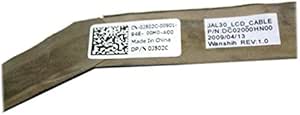
Dell 0J502C LCD Cable Display Connector
Keep your Dell laptop display connected with this OEM replacement LCD cable for reliable screen performance.
View price on Amazon
Affiliate Disclosure: As an Amazon Associate, Studio Supplies earns from qualifying purchases made through links on this page, at no additional cost to you. This helps support our editorial team.
Notice a mistake? Let Us Know
Overview
Ensure Reliable Display Connectivity with the Dell LCD Cable
The Dell LCD Cable (J502C) provides a dependable connection for your LCD screen. This cable is designed to ensure optimal display performance.
Specifications:
- Brand: Dell
- Model: 0J502C
- Type: LCD Cable
Frequently Asked Questions
What Dell laptop models is the 0J502C LCD cable compatible with?
The 0J502C is a Dell OEM part. Check your laptop's service manual or existing cable part number to confirm compatibility before purchasing.
Is this cable used for connecting an external monitor?
No, this is an internal LCD cable that connects the laptop's built-in display panel to the motherboard. It is not an external video cable.
Can this cable fix a flickering or blank laptop screen?
Yes, if the issue is caused by a damaged or worn internal display cable, replacing it with the 0J502C can resolve flickering, intermittent blackouts, or no-display problems.
Is professional installation required?
While experienced users can install it themselves, the process involves opening the laptop chassis and routing the cable through the hinge assembly, so some technical comfort is recommended.
Related Products

