

Dell
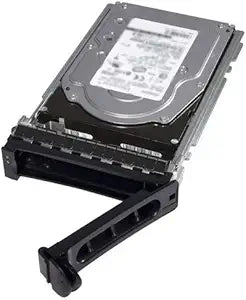
Dell 462-6575 500GB 3.5" Internal Hard Drive
Reliable Storage for Your Dell SystemsThe Dell 500 GB Internal Hard Drive provides dependable storage for your Dell PowerEdge systems. With a 7200 rpm spindle speed, it ensures quick and efficient data access. Brand: Dell Capacity: 500 GB Form Factor: 3.5" Interface: Internal Spindle Speed:...
View price on Amazon
Affiliate Disclosure: As an Amazon Associate, Studio Supplies earns from qualifying purchases made through links on this page, at no additional cost to you. This helps support our editorial team.
Notice a mistake? Let Us Know
Overview
Reliable Storage for Your Dell Systems
The Dell 500 GB Internal Hard Drive provides dependable storage for your Dell PowerEdge systems. With a 7200 rpm spindle speed, it ensures quick and efficient data access.
- Brand: Dell
- Capacity: 500 GB
- Form Factor: 3.5"
- Interface: Internal
- Spindle Speed: 7200 rpm
- Compatibility: PowerEdge R320 (3.5"), R720 (3.5"), R720xd (3.5"), T320 (3.5"), T620 (3.5")
Key Features
Drive Type: Internal
Storage Capacity: 500 GB
Drive Interface: SATA
Drive Interface Standard: SATA/300
Rotational Speed: 7200
Specifications
Drive Type
Internal
Form Factor
3.5"
Storage Capacity
500 GB
Drive Interface
SATA
Drive Interface Standard
SATA/300
Rotational Speed
7200 RPM
Frequently Asked Questions
Is this Dell 462-6575 hard drive compatible with newer motherboards that use SATA III?
Yes, SATA/300 drives like this one are generally backward compatible with SATA III (SATA/600) ports, though they will operate at the SATA/300 speed.
Can this 500GB HDD be used as a primary boot drive?
This 500GB HDD can certainly be used as a primary boot drive, but for faster system startup and application loading, an SSD is typically recommended over an HDD for that purpose.
What are the main benefits of a 7200 RPM rotational speed for a hard drive?
A 7200 RPM rotational speed generally results in faster data access and transfer rates compared to slower 5400 RPM drives, which can improve overall system responsiveness when handling files stored on the drive.
Is this drive suitable for a laptop?
No, this Dell 462-6575 is a 3.5-inch internal hard drive, which is designed for desktop computers and servers, not the smaller 2.5-inch form factor typically found in laptops.
Does this hard drive come with mounting hardware or cables?
The product description does not specify if mounting hardware or cables are included; typically, internal hard drives are sold without these accessories, as they are usually provided with the computer case or motherboard.
Related Products


