

Dell
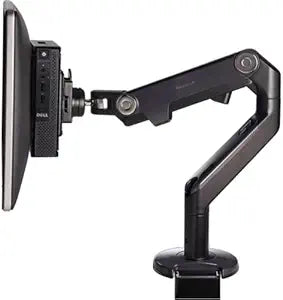
Dell 8541751172 Dual VESA Mount Stand Micro Chassis
Mount two monitors and a Dell OptiPlex Micro PC on a single VESA arm to reclaim desk real estate without sacrificing display flexibility.
$195.00*
View on Amazon
✓ In Stock on Amazon.com
*Price sourced from Amazon.com. Last updated:Aug 30, 2026.Price and availability are subject to change — details.
Affiliate Disclosure: As an Amazon Associate, Studio Supplies earns from qualifying purchases made through links on this page, at no additional cost to you. This helps support our editorial team.
Notice a mistake? Let Us Know
Overview
Specifications
Brand
Dell
Model
8541751172
Product Type
Dual Monitor + Micro PC Mounting Stand
Mounting Interface
VESA (standard)
Monitor Positions
2
Compatible PC
Dell OptiPlex Micro 3020, 9020
Device Support
Desktop Computer (Micro), Flat Panel Display
Mount Type
Freestanding desk stand
Color
Black
Frequently Asked Questions
Which Dell OptiPlex Micro models are confirmed compatible with this mount?
Dell lists the OptiPlex Micro 3020 and 9020 as confirmed compatible chassis. Other OptiPlex Micro generations may physically fit the mounting bracket but are not listed as officially supported — verify dimensions against your specific unit before ordering.
What VESA pattern does this stand use, and does it work with third-party monitors?
The stand uses standard VESA mounting interfaces, which is common across most desktop monitors. However, Dell designed this mount specifically for use with Dell displays alongside a Dell OptiPlex Micro — third-party monitor compatibility depends on matching VESA hole spacing and panel weight limits, neither of which Dell formally specifies for non-Dell use.
Does this stand replace a traditional desk-mounted monitor stand, or does it mount to a wall or arm?
This is a freestanding desk stand — it sits on the desk surface and provides two monitor mounting positions plus an integrated bracket for the OptiPlex Micro chassis. It does not mount to a wall or existing monitor arm.
Does mounting the OptiPlex Micro to this stand restrict airflow or affect thermals?
Dell designed the OptiPlex Micro's venting for vertical mounting scenarios like this stand. However, the Micro should be mounted with its ventilation ports unobstructed — confirm the bracket orientation matches Dell's installation guidelines for your specific Micro model to avoid restricting airflow.
What tools are required for installation?
Standard Phillips screwdriver for attaching VESA mounting hardware to monitor panels and securing the Micro bracket. No specialized tools are required.
Related Products

