



Dell
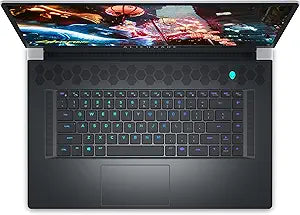
Dell Alienware X17 R2 Gaming Laptop i7 RTX 3070 Ti (Renewed)
FHD1920x1080i7-12700H64GB RAM2TB SSD
Four terabytes of SSD storage and 64GB of DDR5-capable RAM make this Alienware X17 R2 a legitimate mobile workstation that refuses to compromise on gaming frame rates.
$245.00*$2,459.99Save 90%
View on Amazon
✓ In Stock on Amazon.com
*Price sourced from Amazon.com. Last updated:Oct 25, 2026.Price and availability are subject to change — details.
Affiliate Disclosure: As an Amazon Associate, Studio Supplies earns from qualifying purchases made through links on this page, at no additional cost to you. This helps support our editorial team.
Notice a mistake? Let Us Know
Overview
Key Features
Dell Alienware X17 R2 Laptop 17.3" Non-Touch Screen Lunar Light
Intel Core i7 12th Gen i7-12700H Fourteen-Core Processor 3.5GHz (4.7GHz With Turbo Boost)
2TB SSD + 2TB SSD Hard Drive & 64GB RAM Memory
1920x1080 FHD resolution Non-Touch with an integrated Webcam and an GeForce RTX 3070 Ti Graphics Card
Wireless Wifi & Bluetooth. Windows 11 Home
Specifications
Processor
Intel Core i7-12700H, 3.5 GHz (up to 4.7 GHz Turbo), 14-Core / 20-Thread
Graphics
NVIDIA GeForce RTX 3070 Ti, 8GB GDDR6X
Memory
64GB RAM
Storage
2TB SSD + 2TB SSD (4TB total NVMe)
Display
17.3" FHD (1920x1080), Non-Touch
Operating System
Windows 11 Home
Wireless
Wi-Fi, Bluetooth
Webcam
Integrated
Condition
Renewed
Frequently Asked Questions
What does the i7-12700H's 14-core architecture mean for gaming versus creative workloads on this laptop?
The 12700H uses six Performance cores (up to 4.7 GHz boost) and eight Efficiency cores to distribute workloads intelligently. For gaming, the P-cores deliver the single-threaded performance that matters most — competitive with desktop mid-range chips in most titles. For creative work like video rendering, the full 14-core / 20-thread configuration provides mobile workstation throughput that rivals previous-generation desktop chips. The thermal headroom of the X17's larger chassis allows the 12700H to sustain boost frequencies longer than smaller laptops running the same CPU.
Does the RTX 3070 Ti in this laptop perform comparably to its desktop counterpart?
No — mobile GPUs are power-limited relative to desktop variants. The RTX 3070 Ti Laptop GPU operates at 80–150W depending on dynamic boost, versus the desktop card's 290W. Expect approximately 20–30% lower performance than a desktop RTX 3070 Ti. Within the laptop tier, however, it remains one of the fastest available GPUs and delivers strong 1080p and 1440p performance at the 17.3" native resolution.
With 4TB total SSD storage (2TB + 2TB), what are the drive configurations typically used in this chassis?
The Alienware X17 R2 chassis supports two M.2 NVMe slots. A 2TB + 2TB configuration populates both slots with NVMe SSDs — a far more capable storage topology than HDD hybrid configurations. Both drives benefit from PCIe bandwidth, meaning file transfers between drives and application load times remain fast regardless of which drive is in use. This is a meaningfully better configuration than the single-drive alternatives.
Is 64GB of RAM necessary for gaming, and what does it enable beyond that?
For gaming alone, 64GB is well beyond the functional requirement — 16GB is adequate and 32GB covers edge cases. Where 64GB becomes genuinely useful is in concurrent professional workloads: large Premiere Pro projects, RAM-intensive DAW sessions, virtualization, and running multiple resource-heavy applications alongside games. This configuration positions the X17 as a mobile workstation that also games, rather than a gaming laptop with modest multitasking headroom.
This is listed as a renewed unit — what are the practical implications for a laptop of this class?
Renewed means the unit has been inspected, tested, and repackaged — typically by the manufacturer or an authorized refurbisher. For a high-spec laptop like the X17 R2, renewed can represent meaningful savings against new pricing. The key considerations are battery cycle count (renewed units may have partial battery wear), any cosmetic wear on the chassis, and the scope of the warranty provided. Confirm the warranty terms with the seller before purchasing.
Related Products


