



Price history
Dell
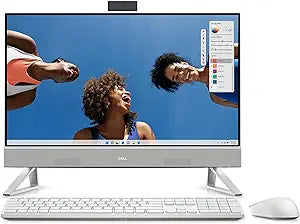
Dell Inspiron 5420 23.8" FHD Touchscreen All-in-One Desktop
★★★★★
A complete all-in-one workstation built around Intel's 13th Gen Core i7, the Inspiron 5420 delivers touchscreen productivity without the cable sprawl of a traditional desktop.
$1,279.99*
View on Amazon
✓ In Stock on Amazon.com
*Price sourced from Amazon.com. Last updated:Jul 23, 2026.Price and availability are subject to change.
Affiliate Disclosure: Studio Supplies may earn a commission from qualifying purchases made through links on this page, at no additional cost to you. This helps support our editorial team.
Notice a mistake? Let Us Know
Overview
Specifications
Processor
13th Gen Intel Core i7-1355U, 10-Core, 1.70 GHz base / 5.00 GHz boost
Memory
16GB DDR4 3200MHz
Storage
1TB NVMe SSD
Display
23.8" InfinityEdge FHD Touchscreen (1920 x 1080)
Graphics
Integrated Intel UHD Graphics
Operating System
Windows 11 Pro (64-bit)
Wireless
Wi-Fi 6 (2x2) Gig+, Bluetooth 5.2
Wired Network
10/100/1000 Mbps Gigabit Ethernet
USB Ports
1x USB 3.2 Gen 2 Type-A, 3x USB 3.2 Gen 1 Type-A, 1x USB 3.2 Gen 2 Type-C
Video Output
1x HDMI 1.4
Memory Card Reader
SD Card Reader 3.0
Audio
Stereo Speakers with MaxxAudio Pro
Webcam
Integrated IR Webcam
Included Accessories
Dell Pro Wireless White Keyboard + Wireless White Mouse
Color
White
Frequently Asked Questions
Is the integrated Intel UHD graphics enough for real work, or will this bottleneck creative tasks?
For productivity work — documents, spreadsheets, video calls, web browsing, light photo editing — integrated Intel UHD Graphics is sufficient and handles the 1080p panel without issue. It will bottleneck in GPU-intensive workloads: 3D rendering, video encoding at 4K, serious gaming, or machine learning tasks. If those are part of your workflow, this machine is not the right fit; you'd need a discrete GPU.
What does a 13th Gen Core i7-1355U actually mean for performance versus older systems?
The i7-1355U is a 10-core efficiency-focused processor (2 performance cores + 8 efficiency cores) that boosts up to 5.0 GHz on the performance cores. Versus a 4-6 year old Core i5 or i7, you'll see significantly faster single-threaded tasks like browser responsiveness and document processing, plus better multi-task headroom. The "U" designation means it's power-optimized, so thermals in this slim all-in-one form factor stay manageable.
How useful is the touchscreen on a 23.8" desktop monitor in practice?
More useful than most people expect for annotation, scrolling, and signing documents, but not a replacement for keyboard and mouse for sustained work. The InfinityEdge display means minimal bezel, so the touch surface covers nearly the full visible panel. It's a genuine productivity add-on, not a checkbox feature.
Can I upgrade the RAM or storage after purchase?
All-in-one form factors like this typically limit post-purchase upgradability — access to internals requires significant disassembly. If 16GB RAM or 1TB SSD are potential bottlenecks for your workflow, configure appropriately at purchase rather than planning an upgrade.
Does Wi-Fi 6 make a noticeable difference over Wi-Fi 5 for daily use?
Yes, particularly in congested environments — apartments, offices, or homes with many connected devices. Wi-Fi 6 handles channel congestion more efficiently, meaning more consistent throughput when the network is busy. Raw speed improvements are real but secondary to the reliability gain in real-world conditions.
Related Products


