

Dell
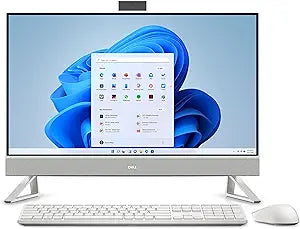
Dell Inspiron 7710 27" FHD Touch All-in-One PC
Dell Inspiron 7710 27" all-in-one delivers touchscreen convenience with 64GB RAM and dual-drive storage for home and office.
View price on Amazon
Affiliate Disclosure: As an Amazon Associate, Studio Supplies earns from qualifying purchases made through links on this page, at no additional cost to you. This helps support our editorial team.
Notice a mistake? Let Us Know
Overview
Experience Immersive Computing with the Dell Inspiron 7710 All-in-One
The Dell Inspiron 7710 All-in-One desktop combines powerful performance with a sleek design, offering an exceptional computing experience for both work and play. Featuring a vibrant Full HD touchscreen display, the latest Intel Core i7 processor, and ample memory and storage, this all-in-one is designed to meet all your needs.
- Processor: 12th Generation Intel Core i7-1255U 10-Core 1.70 GHz Processor (Turbo Boost up to 4.70 GHz)
- Memory: 64GB DDR4 3200 MHz Memory
- Storage: 1TB NVMe SSD + 1TB SATA Hard Drive
- Operating System: Windows 11 Pro (64-bit)
- Display: 27-Inch Touchscreen Infinity Full HD (1920 x 1080) Display
- Graphics: NVIDIA GeForce MX550 2GB GDDR6 Graphics Card
- Wireless: Wi-Fi 6E (6GHz) AX211 2x2 Bluetooth 5.2
- Ports: 1x USB 3 Gen 2, 3x USB 3 Gen 1, 1x USB 3 Gen 2 Type-C, 1x HDMI 1.4, 1x 5-in-1 SD Card Reader, 1x RJ-45, 1x Audio Jack
- Included: Dell Pro Wireless White Keyboard + Wireless White Mouse, A/C Adapter
Frequently Asked Questions
Does the Dell Inspiron 7710 support dual monitors via the HDMI port?
The HDMI 1.4 port is input-only on some configurations and output on others. Check Dell's documentation for your specific build, but the USB-C port with DisplayPort alt-mode can also drive an external display.
Can the RAM in the Inspiron 7710 be upgraded beyond 64GB?
This unit ships with 64GB DDR4 already installed. The 7710 chassis supports SO-DIMM slots, but 64GB is typically the maximum supported by the motherboard.
Is the touchscreen useful for everyday productivity tasks?
Yes. The 27-inch touchscreen works well for scrolling, zooming, and navigating applications. It's especially convenient for casual browsing, photo sorting, and whiteboard-style apps in Windows 11.
How loud is the Inspiron 7710 under normal use?
As an all-in-one, the 7710 uses a low-power U-series processor and compact cooling, so it runs relatively quiet during everyday tasks like browsing and document work. Sustained heavy loads will spin up the internal fan.
Does this model include a webcam?
Yes. The Inspiron 7710 has a built-in webcam integrated into the top bezel of the display.
Related Products

