



Dell
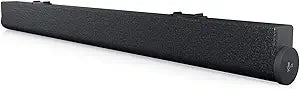
Dell GCM1V SB522A Slim Conferencing Soundbar
AI noise-cancelling USB soundbar that magnetically docks to your Dell monitor for clutter-free conferencing
$69.99*
View on Amazon
✓ In Stock on Amazon.com
*Price sourced from Amazon.com. Last updated:Aug 29, 2026.Price and availability are subject to change — details.
Affiliate Disclosure: As an Amazon Associate, Studio Supplies earns from qualifying purchases made through links on this page, at no additional cost to you. This helps support our editorial team.
Notice a mistake? Let Us Know
Overview
Key Features
This slim soundbar attaches magnetically to Dell select monitors, leaving you extra desk space.
Have quick access to meetings and notifications with the dedicated MS Teams button and the integrated volume knob and mute button located on the soundbar.
Enjoy full duplex audio with echo cancellation on this Microsoft Teams-certified soundbar. Now you can easily follow conversations, even with multiple participants speaking simultaneously.
The Dell Peripheral Manager (DPM) Audio Control with Equalization (EQ) allows you to create sound profiles for precise control of audio output.
The most intelligent audio: Stay focused on your conversations with the world’s first Microsoft Teams-certified soundbar with AI noise-cancellation that reduces background noise while preserving the clarity of human voices.
Specifications
Brand
Dell
Model
SB522A
Type
Slim Conferencing Soundbar
Connectivity
USB-A
Mounting
Magnetic attachment for select Dell monitors
Noise Cancellation
AI-powered, on-device DSP
Audio
Full duplex with echo cancellation
Controls
Dedicated MS Teams button, volume knob, mute button, call answer/end
Software
Dell Peripheral Manager with EQ profiles
Certifications
Microsoft Teams Certified, Zoom Certified
Color
Black
Frequently Asked Questions
Which Dell monitors support the magnetic attachment?
The SB522A attaches magnetically to select Dell monitors with a dedicated magnetic mounting channel along the bottom bezel. Compatible models include Dell P, U, and C series monitors from 2021 onward. Check Dell's compatibility list for your specific monitor model before purchasing.
Does this soundbar work with non-Dell monitors or laptops?
Yes. The SB522A connects via USB-A and functions as a standard USB audio device on any Windows or Mac system. You lose the magnetic mounting on non-Dell monitors, but the audio and microphone functionality work independently of the display brand.
How does the AI noise cancellation work?
The onboard DSP processes the microphone input in real time, identifying and suppressing non-voice sounds — keyboard clicks, fan noise, background conversation — while preserving vocal clarity. This runs on the soundbar's hardware, not your PC's CPU, so there's no software processing overhead.
Can I use this soundbar for music or media playback outside of calls?
You can, and the Dell Peripheral Manager EQ profiles let you tune the output. However, the SB522A is engineered for voice-band clarity in a slim form factor, so it lacks the bass response and stereo separation you'd expect from a dedicated media speaker.
Does the dedicated Microsoft Teams button work with other conferencing platforms?
The hardware Teams button provides one-touch meeting join and notification access within Microsoft Teams specifically. For Zoom (which this bar is also certified for) and other platforms, you'll use the standard mute and call answer/end controls on the soundbar.
Related Products


