

Dell
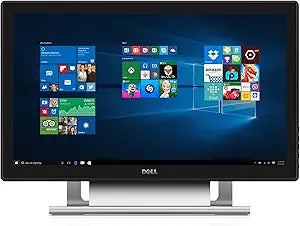
Dell H6V56 S2240T 21.5-Inch Touch Screen Monitor
★★★★★
Interactive Productivity: Dell S2240T 21.5-Inch Touch Screen MonitorThe Dell S2240T touch screen monitor delivers an intuitive and engaging user experience, ideal for work, school, or entertainment. With its multi-touch capability and Full HD resolution, this monitor enhances productivity and col...
$495.00*
View on Amazon
✓ In Stock on Amazon.com
*Price sourced from Amazon.com. Last updated:Jul 14, 2026.Price and availability are subject to change.
Affiliate Disclosure: Studio Supplies may earn a commission from qualifying purchases made through links on this page, at no additional cost to you. This helps support our editorial team.
Notice a mistake? Let Us Know
Overview
Interactive Productivity: Dell S2240T 21.5-Inch Touch Screen Monitor
The Dell S2240T touch screen monitor delivers an intuitive and engaging user experience, ideal for work, school, or entertainment. With its multi-touch capability and Full HD resolution, this monitor enhances productivity and collaboration.
Specifications
- Diagonal Viewable Size: 21.5" (18.77" horiz., 10.56" vert.)
- Display Type: Multi-touch full HD LED
- Resolution: Full HD 1920 x 1080 (60Hz)
- Aspect Ratio: 16:9 (widescreen)
- Contrast Ratio: 3,000:1 (typical), 8 million:1 (dynamic, max)
- Max Viewing Angle: 178° vertical (typical), 178° horizontal (typical)
- Brightness: 250 cd/m2 (typical)
- Color Gamut: CIE1931 (72%)
- Response Time: 25 ms (typical), 12 ms (typical) with Overdrive
- Pixel Pitch: 0.248 x 0.248 mm
- Connectivity: HDMI, DVI, VGA
- Touch Points: 10
- Weight (Monitor Only): 7.49 pounds
- Dimensions (with stand): Height: 370.8 mm (14.60 inches), Width: 522.5 mm (20.57 inches), Depth: 205.7 mm (8.10 inches)
Key Features
Sleek and stylish - Edge-to-edge glass gives the Dell 21.5" touch monitor a clean finish that boasts of fine craftsmanship.
Enabling touch is easy! Simply connect a USB cable from your PC to the monitor's USB upstream port, and use either an HDMI, DVI or VGA cable to project images onscreen
This is not a computer. Requires a standalone computer to use.Touch technology:Projected capacitive system,Sensor stack thickness:1.1 mm,Cover glass thickness:1.1 +/- 0.2 mm,Touch method:Fingers and thin gloves,Touch point:10 touch-points,Response time:25 ms. Compatibility- All Operating System
Weight of monitor only (without stand): 7.49 pounds .Height (extended):370.8 mm (14.60 inches),Width:522.5 mm (20.57 inches),Depth:205.7 mm (8.10 inches)
Specifications
Brand
Dell
Model
S2240T
Screen Size
21.5-Inch
Touch Technology
Projected capacitive system
Touch Points
10
Response Time
25 ms
Sensor Stack Thickness
1.1 mm
Cover Glass Thickness
1.1 +/- 0.2 mm
Touch Method
Fingers and thin gloves
Compatibility
All Operating System
Video Inputs
HDMI, DVI, VGA
Weight (without stand)
7.49 pounds
Height (extended)
370.8 mm (14.60 inches)
Width
522.5 mm (20.57 inches)
Depth
205.7 mm (8.10 inches)
Pros & Cons
👍 Pros
- The Dell S2240T features an edge-to-edge glass design, offering a sleek and stylish aesthetic for any workspace.
- Its projected capacitive touch system supports 10 touch-points, allowing for intuitive multi-touch interactions.
- Enabling touch functionality is straightforward, requiring only a USB cable connection from the PC to the monitor.
- The monitor is compatible with all operating systems, ensuring broad usability across different computing environments.
- It offers multiple video input options, including HDMI, DVI, or VGA, for versatile connectivity with various computers.
👎 Cons
- This Dell S2240T is strictly a monitor and requires a standalone computer to function, it is not an all-in-one PC.
- The touch response time of 25 ms might introduce a slight delay compared to monitors with lower response times, particularly noticeable in fast-paced interactions.
- Specific details about the display resolution, panel type (e.g., IPS, TN, VA), or refresh rate are not provided.
- The cover glass thickness of 1.1 +/- 0.2 mm, while contributing to durability, might be thicker than some ultra-thin displays.
- The monitor's weight of 7.49 pounds without the stand might be relatively heavy for some users when considering mounting options.
Frequently Asked Questions
Is the Dell S2240T a standalone computer?
No, the Dell S2240T is not a computer; it requires a standalone computer to function and project images on screen.
How do I enable the touch functionality on this monitor?
To enable touch, you simply need to connect a USB cable from your PC to the monitor's USB upstream port.
What types of video inputs are compatible with this monitor?
You can connect images to the screen using either an HDMI, DVI, or VGA cable.
What operating systems is the touch screen compatible with?
The Dell S2240T touch screen monitor is compatible with all operating systems.
What is the touch technology used in this monitor?
This monitor utilizes a Projected Capacitive System for its touch technology, supporting 10 touch-points.
What is the response time for the touch input?
The touch response time for this monitor is 25 ms, ensuring a fairly responsive interaction.
Can I use gloves with the touch screen?
Yes, the touch method is compatible with fingers and thin gloves.
Related Products


