



Price history
Dell
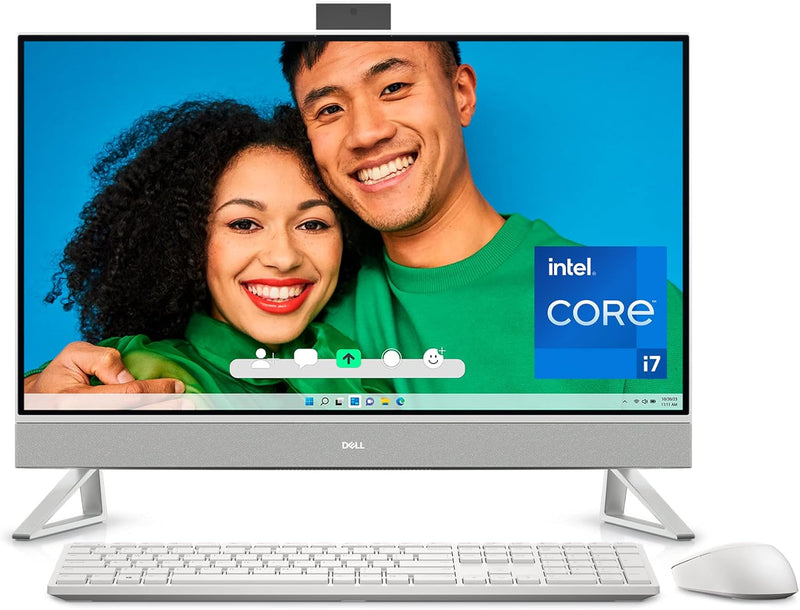
Dell i7720-7992WHT-PUS Inspiron 7720 All-in-One: i7, 32GB, MX550
★★★★★
FHD
A 27-inch touchscreen workstation packing Core i7, 32GB DDR4, and discrete MX550 graphics into a single cable-free form factor.
$1,599.99*
Check availability
*Price sourced from Amazon.com. Last updated:Jul 24, 2026.Price and availability are subject to change.
Affiliate Disclosure: Studio Supplies may earn a commission from qualifying purchases made through links on this page, at no additional cost to you. This helps support our editorial team.
Notice a mistake? Let Us Know
Overview
Key Features
NARROW BORDERS: Immerse yourself in an expansive FHD screen with four-side narrow borders on this all-in-one desktop. Enjoy a stunning visual experience.
INNOVATIVE STAND: Featuring innovative stand designs that offer better stability and additional desk space.
COMFORTVIEW PLUS: Enhance eye comfort with ComfortView Plus on this all-in-one desktop. It reduces low blue light while maintaining accurate colors for optimized viewing.
TV-INSPIRED DISPLAY: Stunning 27-inch All-In-One desktop with TV-inspired design available in Snowflake, with triangle stand and molded speaker mesh.
DELL SERVICES: 1 Year of Dell Premium Support with priority access to dedicated experts anywhere, anytime, even when traveling internationally. 6 Months Dell Migrate is the simple do-it-yourself tool that moves your hard to replace data, personal records and important files to your latest Dell PC.
Specifications
Processor
Intel Core i7-1355U (13th Gen)
RAM
32GB DDR4 3200 MHz
Storage
512GB SSD + 1TB HDD
Graphics
NVIDIA GeForce MX550 GDDR6
Display
27-inch FHD Touchscreen (1920 x 1080)
Operating System
Windows 11 Pro
Wireless
802.11ax (Wi-Fi 6)
Ports
5 x USB 3.0, RJ-45 Ethernet
Color
White (Snowflake)
Model
i7720-7992WHT-PUS
Frequently Asked Questions
What is the Intel Core i7-1355U, and what does it mean for day-to-day performance?
The i7-1355U is a 13th-gen Intel Core processor with a 10-core (2P+8E) configuration and a 15W base TDP. In practice, it handles multitasking, browser-heavy workflows, and light content editing without thermal throttling — but it is a U-series mobile chip, not a desktop H-series, so sustained CPU-bound loads will hit a ceiling faster than a tower workstation.
Is the NVIDIA GeForce MX550 capable of GPU-accelerated tasks like video editing or Lightroom?
Yes, with caveats. The MX550 uses GDDR6 memory and supports CUDA, so apps like Adobe Premiere and DaVinci Resolve can offload GPU tasks to it. However, with only 2GB of VRAM on the MX550, complex timelines or 4K proxies will push it hard. It is a meaningful step above Intel Iris Xe integrated graphics, but not a replacement for a workstation-class GPU.
What does the dual-storage configuration (512GB SSD + 1TB HDD) mean for workflow?
The SSD handles the OS, applications, and active project files — giving you fast boot and app-launch times. The 1TB HDD is slower rotational storage suited for archiving, media libraries, or backup. This is a practical tiered setup, though power users may want to migrate the HDD data to an external SSD over time.
Does the 27-inch FHD (1920×1080) display hold up at this screen size?
At 27 inches, 1080p yields approximately 81 PPI — noticeably softer than a QHD (2560×1440) panel at the same size. Text and UI elements are clean enough for productivity use, but anyone doing photo editing or working at close distances may find pixel density underwhelming. The ComfortView Plus low-blue-light implementation is a genuine daily-use benefit.
Is the RAM upgradeable or soldered?
Dell does not publicly confirm socketed RAM on this specific configuration. Treat it as fixed at 32GB for planning purposes — but 32GB DDR4-3200 is generous enough that most users will not hit that ceiling in typical workloads.
Related Products


