

Dell
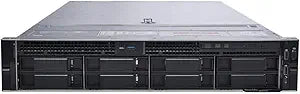
Dell Precision Rack 7920 Xeon P2000 Workstation - Renewed
DisplayPort
Unleash Powerful Performance with Dell Precision Rack 7920 Experience reliable computing power with the Dell Precision Rack 7920 Workstation. Designed for demanding professional applications, this renewed workstation delivers robust performance with its Intel Xeon Bronze processor and ample memor...
$7,144.95*
View on Amazon
✓ In Stock on Amazon.com
*Price sourced from Amazon.com. Last updated:Aug 30, 2026.Price and availability are subject to change — details.
Affiliate Disclosure: As an Amazon Associate, Studio Supplies earns from qualifying purchases made through links on this page, at no additional cost to you. This helps support our editorial team.
Notice a mistake? Let Us Know
Overview
Unleash Powerful Performance with Dell Precision Rack 7920
Experience reliable computing power with the Dell Precision Rack 7920 Workstation. Designed for demanding professional applications, this renewed workstation delivers robust performance with its Intel Xeon Bronze processor and ample memory. Ideal for businesses seeking cost-effective solutions without compromising on quality.
Specifications:
- Brand: Dell
- Model: Intel Xeon
- Processor: Bronze 3104 6C 1.7Ghz
- Memory: 768GB
- Storage: 2X Trays
- Graphics: P2000
- Operating System: No OS (Renewed)
Key Features
1.7Ghz Six Core Bronze 3104 CPU, 12 Virtual Cores in Hyper-Threading Mode!
768GB of ECC DDR4 RAM
No Hard Drives, 2x DriveTrays
Nvidia Quadro P2000 5GB GDDR5 Graphic Card - 4 DisplayPort - 4 Active Monitor Support
No OS
Specifications
Model
Precision Rack 7920
Processor
1.7Ghz Six Core Bronze 3104 CPU
Virtual Cores
12 in Hyper-Threading Mode
RAM
768GB ECC DDR4
Storage
No Hard Drives (2x DriveTrays included)
Graphics Card
Nvidia Quadro P2000 5GB GDDR5
Graphics Outputs
4 DisplayPort
Monitor Support
4 Active Monitors
Operating System
No OS
Condition
Renewed
Frequently Asked Questions
Does this renewed workstation come with hard drives installed?
No, this Dell Precision Rack 7920 workstation does not include hard drives; however, it comes with two drive trays for user-supplied storage.
What kind of processor is included with this workstation?
It features a 1.7Ghz Six Core Bronze 3104 CPU, which offers 12 virtual cores in Hyper-Threading Mode for enhanced processing capabilities.
How much RAM is pre-installed in this workstation?
This workstation is equipped with a substantial 768GB of ECC DDR4 RAM, suitable for memory-intensive applications.
Is an operating system included with the Dell Precision Rack 7920?
No, the workstation does not come with an operating system installed, requiring the user to provide and install one.
What graphics card is featured in this workstation?
It includes an Nvidia Quadro P2000 5GB GDDR5 Graphics Card, which supports professional visual tasks and multiple displays.
How many monitors can this graphics card support simultaneously?
The Nvidia Quadro P2000 graphics card has 4 DisplayPort outputs and is capable of supporting 4 active monitors simultaneously.
Related Products


