



Dell
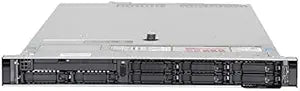
Dell Intel Xeon PowerEdge R440 Server, Bronze 3104, 512GB RAM, 1.6TB SSD
512GB ECC RAM and dual 800GB SSDs give this renewed PowerEdge R440 the memory density to run serious virtualization workloads at a fraction of new-server pricing.
View price on Amazon
Affiliate Disclosure: As an Amazon Associate, Studio Supplies earns from qualifying purchases made through links on this page, at no additional cost to you. This helps support our editorial team.
Notice a mistake? Let Us Know
Overview
Reliable Performance for Your Business Needs: Dell PowerEdge R440 (Renewed)
The Dell PowerEdge R440 is a dependable server solution designed for various business applications. This renewed server features an Intel Xeon Bronze 3104 processor, 512GB of RAM, and dual 800GB SSDs, providing a balance of performance and storage capacity. Equipped with an H330 controller, the R440 offers reliable data management for your critical workloads.
Specifications:
- Brand: Dell
- Model: Intel Xeon
- Condition: Renewed
- Processor: Intel Xeon Bronze 3104 6C 1.7Ghz
- Memory: 512GB RAM
- Storage: 2x 800GB SSD
- Form Factor: 8B SFF
- Controller: H330
Frequently Asked Questions
What workloads is the Xeon Bronze 3104 actually suited for?
The Bronze 3104 is a 6-core, 1.7GHz fixed-clock processor with no Turbo Boost and no Hyper-Threading. It's designed for light to moderate server tasks — file services, low-traffic web hosting, lightweight virtualization (4–8 VMs depending on memory allocation), and database applications with modest query concurrency. It is not the right processor for CPU-intensive compute workloads.
How much does 512GB of RAM matter for a server at this processor tier?
Significantly — RAM is often the primary constraint in virtualization. 512GB of ECC RAM allows you to run a substantial number of VMs even if the Bronze 3104 limits per-VM CPU throughput. For memory-dense workloads like large in-memory databases or over-provisioned VM hosts, the RAM capacity is the standout specification here.
What does the H330 RAID controller support?
The Dell H330 is an entry-level RAID controller supporting RAID 0, 1, 5, and 10. It does not include a battery-backed write cache (BBWC), which means it lacks the write-performance boost of caching controllers like the H730. For read-heavy workloads or SSD-backed storage, this is generally acceptable.
What does "renewed" mean for this server, and what should I verify on arrival?
Renewed indicates refurbished/recertified hardware. You should verify iDRAC access is functioning, run Dell's built-in BIOS hardware diagnostics (F10 at POST), confirm all DIMM slots register correctly, and check SSD health via the H330's storage management interface before deploying.
Can this server be expanded with additional drives or RAM?
The R440 supports up to 8x 2.5" SFF drives in this configuration. RAM expandability depends on how many DIMM slots are currently populated — the Bronze 3104 platform supports up to a specific maximum per channel, so check slot occupancy before purchasing additional DIMMs.
Related Products


