



Dell
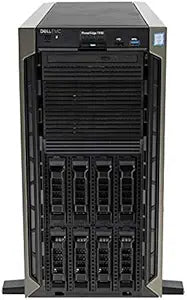
Dell Intel Xeon T440: 8 x 3.5, 2X Gold 5118, 64GB, 2X 10TB, H730 (Renewed)
Dual Xeon Gold 5118 compute and 20TB of hot-plug storage make the PowerEdge T440 a tower server that punches at rack-mount performance levels.
View price on Amazon
Affiliate Disclosure: As an Amazon Associate, Studio Supplies earns from qualifying purchases made through links on this page, at no additional cost to you. This helps support our editorial team.
Notice a mistake? Let Us Know
Overview
Unleash Server Performance with the Dell PowerEdge T440
The Dell PowerEdge T440 is designed to deliver powerful and reliable performance for small and medium-sized businesses. Featuring dual Intel Xeon Gold processors, ample RAM, and high-capacity storage, it's an ideal solution for file and print serving, web hosting, and application workloads.
Specifications:
- Server Type: Dell PowerEdge T440
- Drive Bays: 8 x 3.5" Hot Plug
- Processors: 2x Intel Xeon Gold 5118 (Twelve Core, 2.3Ghz)
- Memory: 64GB RAM
- Storage: 2x 10TB
- Controller: H730
- Power Supplies: 2x PSU
Frequently Asked Questions
What workloads are the dual Gold 5118 processors best suited for?
Each Gold 5118 is a 12-core, 24-thread Skylake-SP chip running at 2.3GHz base with a 3.2GHz max turbo and 16.5MB L3 cache. Combined, you have 24 physical cores and 48 threads — well-suited for virtualization, SQL Server, file serving, and application workloads that scale with thread count rather than single-core speed.
What RAID configurations are possible with the H730 controller and two 10TB drives?
The Dell PERC H730 supports RAID 0, 1, 5, 6, 10, 50, and 60. With only two drives installed, your practical options are RAID 0 (20TB raw, no redundancy) or RAID 1 (10TB usable, full mirror). Adding drives unlocks RAID 5 and 10 for a better performance/redundancy balance.
Can the T440 be expanded beyond the current 64GB of RAM?
Yes. The PowerEdge T440 supports up to 1TB of DDR4 ECC registered memory across 16 DIMM slots, depending on the processor configuration. Expansion should use registered ECC DDR4 DIMMs validated on Dell's memory compatibility list for this platform.
Is the T440 tower form factor suitable for a non-data-center environment?
Yes — the T440's tower chassis is designed for machine room, wiring closet, or even office environments where rack infrastructure doesn't exist. It operates on standard power and produces less ambient noise than rack-mounted equivalents in open cooling configurations, though it is still a server-class machine with server-class acoustics under load.
Does the H730 controller include a cache battery, and does it affect performance?
The Dell PERC H730 includes a 1GB non-volatile cache backed by a capacitor (NVCM) or battery-backed unit (BBU) depending on configuration. When the cache is active and write-back mode is enabled, write performance improves substantially. Verify the cache module and BBU status via Dell's OMSA or iDRAC upon initial setup.
Related Products


