



Dell
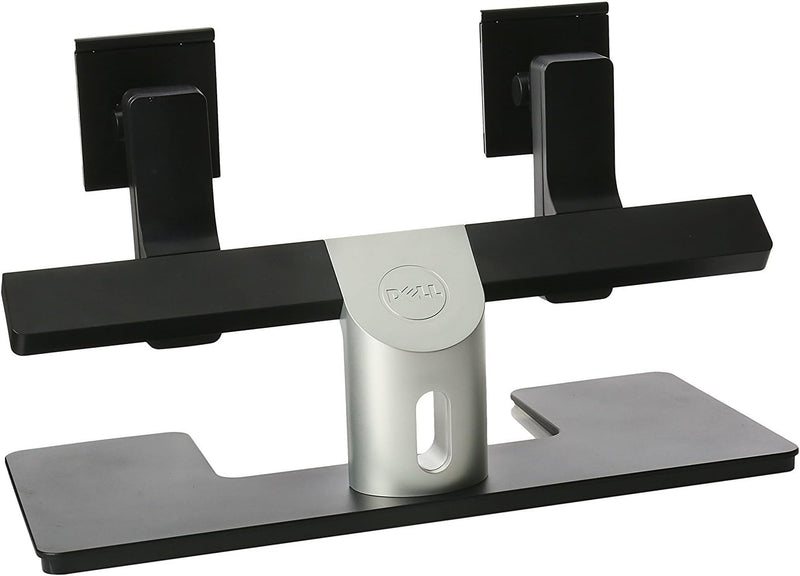
Dell MDS14A Dual Monitor Stand - Black/Silver
Maximize Your Workspace with the Dell MDS14 Dual Monitor Stand The Dell MDS14 Dual Monitor Stand is designed to optimize your workspace and enhance productivity. Supporting two monitors, this stand provides a stable and ergonomic solution for multi-screen setups. With a sleek black and silver fin...
$152.11*$160.40Save 5%
View on Amazon
✓ In Stock on Amazon.com
*Price sourced from Amazon.com. Last updated:Aug 28, 2026.Price and availability are subject to change — details.
Affiliate Disclosure: As an Amazon Associate, Studio Supplies earns from qualifying purchases made through links on this page, at no additional cost to you. This helps support our editorial team.
Notice a mistake? Let Us Know
Overview
Maximize Your Workspace with the Dell MDS14 Dual Monitor Stand
The Dell MDS14 Dual Monitor Stand is designed to optimize your workspace and enhance productivity. Supporting two monitors, this stand provides a stable and ergonomic solution for multi-screen setups. With a sleek black and silver finish, it complements any desktop environment while freeing up valuable desk space.
Specifications:
- Height: 9 inches
- Width: 30 inches
- Depth: 19.5 inches
- Screen Size: 60.96 Inches
- Screen Resolution: 1600 x 1200
- Max Screen Resolution: 1920 x 1200
- USB Ports: 2 x USB 2.0
- Color: Black/Silver
Key Features
The stand provides height, tilt and swivel adjustments for two monitors of same or various sizes. It allows for the two monitors to slide laterally, ensuring they are always on the same plane.
Specifications
Monitor Capacity
Two monitors
Height Adjustment
Yes
Tilt Adjustment
Yes
Swivel Adjustment
Yes
Lateral Adjustment
Monitors slide laterally
Compatibility
Monitors of same or various sizes
Color
Black/Silver
Frequently Asked Questions
Can this stand be used with monitors of different sizes?
Yes, the Dell MDS14A Dual Monitor Stand is designed to provide adjustments for two monitors of both same and various sizes.
What types of adjustments are available for the monitors on this stand?
This stand offers height, tilt, and swivel adjustments, allowing for a personalized ergonomic setup for your two displays.
Does the stand allow for precise alignment of the two monitors?
Yes, the stand allows for the two monitors to slide laterally, which ensures they can always be placed on the same visual plane.
Is this stand suitable for saving desk space compared to individual monitor stands?
This dual monitor stand helps consolidate the footprint of two monitors, which can contribute to a more organized and spacious desk area.
What colors is the Dell MDS14A Dual Monitor Stand available in?
The Dell MDS14A Dual Monitor Stand is available in a Black/Silver finish.
Related Products


