

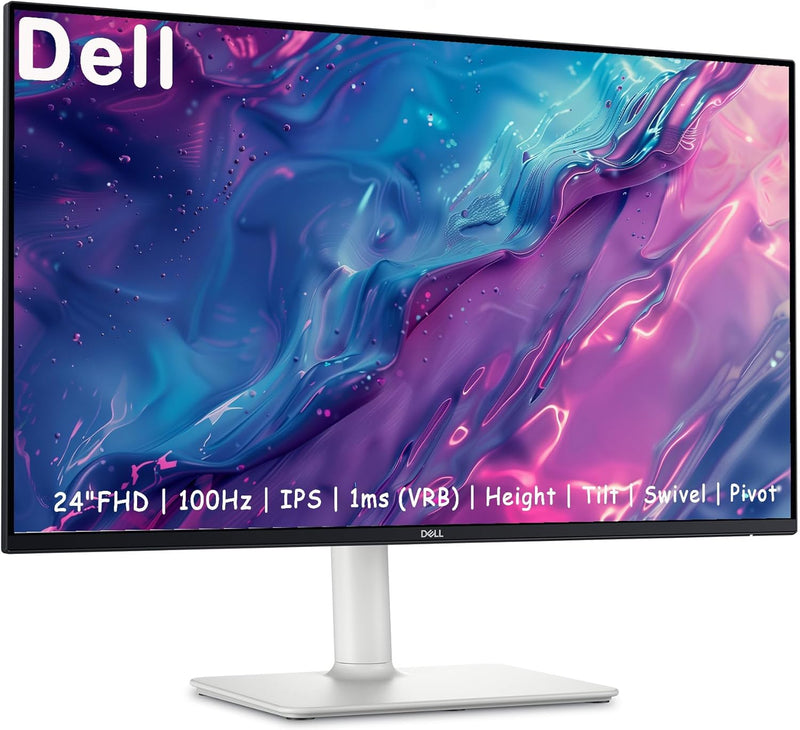


Dell
Dell S24 Inch FHD Monitor 100Hz AMD FreeSync Integrated Speakers
FHD1080p24 inch3W
A 100Hz IPS panel with full ergonomic adjustability and AMD FreeSync makes the Dell S24 a remarkably complete productivity and light-gaming display at its size.
View price on Amazon
Affiliate Disclosure: As an Amazon Associate, Studio Supplies earns from qualifying purchases made through links on this page, at no additional cost to you. This helps support our editorial team.
Notice a mistake? Let Us Know
Overview
Key Features
【Stunning monitor】: Gaming or Office 24 inch monitor wit can display more realistic images and more saturated colors, present you with impressive visual effects. Anti-Glare Display Design An anti-glare display makes viewing the display more pleasant for users and reduces eyestrain for users. Crisp, true-to-life colors come alive in Full HD 1080p resolution
【Wide Compatibility】: Enhance productivity whether at the office or home workspace with versatile 2 x HDMI Ports. Perfect as a secondary monitor for laptops or desktop computers, this monitor adapts to your needs seamlessly. compatible with most normal graphics cards.
【Comfortable viewing experience】: Enjoy optimal comfort with an easily tiltable 144Hz monitor featuring a quick 1ms response time and an anti-glare coating. Viewing angle 178° This combination ensures that you enjoy smooth, clear, sharp images ,while meeting a wide range of needs
【Space-saving setup】: Customize your view with tilt, swivel, pivot and adjust the height of your monitor for a comfortable setup all day long.
【computer monitor 】:Enjoy impressive audio with the integrated dual 3W speakers with a wide dynamic range. Easy options of 5 preset and 1 customizable audio profiles to tailor for every moment.
Specifications
Screen Size
24 inches
Resolution
1920 x 1080 (Full HD)
Panel Type
IPS
Refresh Rate
100Hz
Response Time
1ms
Sync Technology
AMD FreeSync
Aspect Ratio
16:9
Viewing Angle
178° Horizontal / Vertical
Display Inputs
2x HDMI, 1x VGA
Speakers
Integrated 2x 5W with 5 presets
Adjustability
Height, Tilt, Swivel, Pivot
Features
Anti-Glare, Low Blue Light, Flicker-Free
Frequently Asked Questions
What does AMD FreeSync actually do on this monitor, and do I need a specific GPU to use it?
FreeSync synchronizes the monitor's refresh rate to your GPU's frame output, eliminating screen tearing and stutter within the supported range. It's compatible with AMD Radeon GPUs natively and works with most modern NVIDIA cards via Adaptive Sync support — check your GPU's specs to confirm.
Is the 1ms response time GTG or MPRT, and does it matter for everyday use?
The listed 1ms is MPRT (Moving Picture Response Time), a marketing metric measuring backlight strobe duty cycle rather than pixel transition speed. For general productivity and casual gaming at 100Hz, this distinction is largely academic — you'll see clean motion. Competitive esports players who prioritize pixel-level sharpness in fast motion may want to benchmark their specific use case.
The listing mentions both 100Hz and 144Hz — what is the actual maximum refresh rate?
The confirmed maximum refresh rate is 100Hz. Competing product descriptions from this listing contain a discrepancy; Dell's specification sheet for the S24 IPS panel rates it at 100Hz. At 100Hz over a standard 1080p signal, you get noticeably smoother motion than 60Hz without requiring a high-end GPU.
What inputs are available, and can I run two computers simultaneously?
The S24 has two HDMI ports and one VGA port. You can connect two HDMI sources (e.g., a laptop and a desktop) and switch between them via the OSD menu. There is no DisplayPort on this model — a limitation to note if your primary device only has DP output.
How useful are the integrated speakers for day-to-day work?
The dual 3W speakers are functional for video calls, background music, and system audio — adequate for a desk setup without dedicated speakers. They won't deliver meaningful bass or high-volume performance. The five preset audio profiles help tailor the sound character for voice versus media content.
Related Products


