



Dell
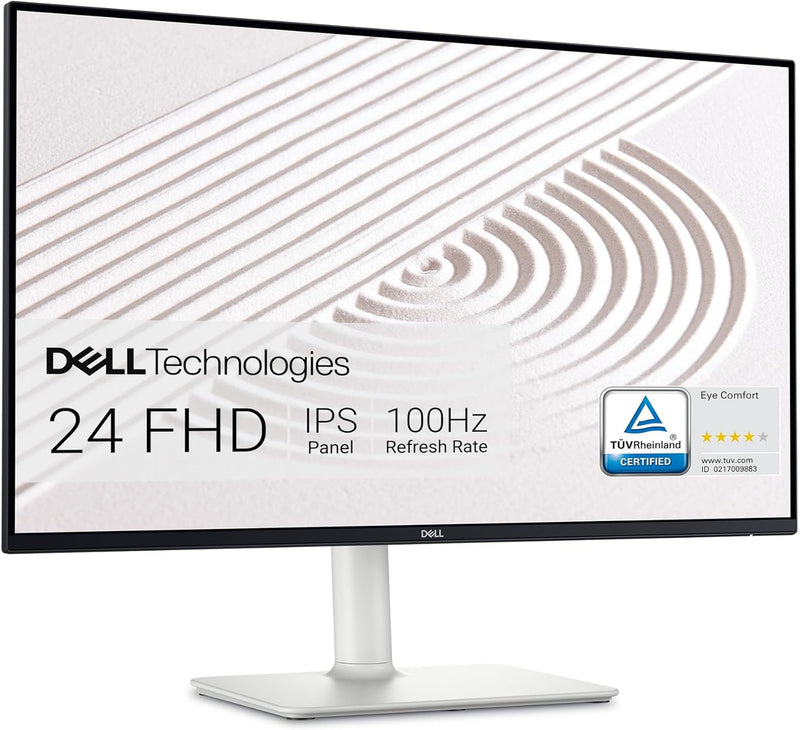
Dell S2425HS 23.8" FHD 100Hz Eye Comfort Monitor
FHD5W
Immersive Visuals and Superior Comfort The Dell S2425HS Monitor delivers stunning FHD visuals, integrated speakers, and a comfortable viewing experience. With its sleek design, TÜV Rheinland Eye Comfort certification, and versatile connectivity options, it's perfect for both work and play. Speci...
$125.84*$149.99Save 16%
Check availability
*Price sourced from Amazon.com. Last updated:Aug 30, 2026.Price and availability are subject to change — details.
Affiliate Disclosure: As an Amazon Associate, Studio Supplies earns from qualifying purchases made through links on this page, at no additional cost to you. This helps support our editorial team.
Notice a mistake? Let Us Know
Overview
Immersive Visuals and Superior Comfort
The Dell S2425HS Monitor delivers stunning FHD visuals, integrated speakers, and a comfortable viewing experience. With its sleek design, TÜV Rheinland Eye Comfort certification, and versatile connectivity options, it's perfect for both work and play.
Specifications:
- Brand: Dell
- Model: S2425HS
- Display Size: 23.8 Inch
- Resolution: FHD (1920x1080)
- Refresh Rate: 100Hz
- Contrast Ratio: 1500:1
- Speakers: Integrated 2x5W
- Eye Comfort: TÜV Rheinland Eye Comfort 4 Star
- Adjustability: Height/Tilt/Swivel/Pivot
- Color: Ash White
Key Features
Modern, lifestyle-inspired design with ultrathin bezels let you enjoy the stunning screen with less distraction.
Enjoy impressive audio with the integrated dual 5W speakers with a wide dynamic range. Easy options of 5 preset and 1 customizable audio profiles to tailor for every moment.
Experience consistent vibrant colors across a wide viewing angle enabled by In-plane switching technology with 99% sRGB color coverage.
Connect with ease with convenient primary connections and easy side access to secondary connections that offer multiple input ports in a multi-device setup. An improved cable management design offers a more pleasing, clutter-free set up that optimize your desk space. You can also navigate and manage the OSD menus with new joystick and shortcut buttons on the back of the monitor.
Seamlessly switch between streaming and casual gaming with the built-in dual HDMI connectivity ports.
Customize your view with tilt, swivel, pivot and adjust the height of your monitor for a comfortable setup all day long.
This 23.8" monitors achieve TÜV Rheinland 4-star eye comfort certification — the latest industry standard for eye comfort to help reduce signs of eye fatigue.
Benefit from improved ComfortView Plus, a built-in feature that reduces blue light emission to less than 35%, and the 100Hz refresh rate that delivers smoother motion visuals, ensuring seamless viewing experience and perfect for casual gaming sessions.
Specifications
Model
S2425HS
Screen Size
23.8"
Resolution
FHD (Full High Definition)
Refresh Rate
100Hz
Panel Technology
In-plane switching (IPS)
Color Coverage
99% sRGB
Audio
Integrated Dual 5W Speakers
Audio Profiles
5 Preset, 1 Customizable
Connectivity
Dual HDMI
Ergonomics
Tilt, Swivel, Pivot, Height Adjustment
Eye Comfort Certification
TÜV Rheinland 4-star
Blue Light Reduction
ComfortView Plus (less than 35%)
Frequently Asked Questions
What is the refresh rate of this Dell S2425HS monitor?
This Dell S2425HS monitor features a 100Hz refresh rate, which provides smoother motion visuals for both streaming content and casual gaming.
Does this monitor include built-in speakers?
Yes, it comes with integrated dual 5W speakers, offering impressive audio with a wide dynamic range and options for 5 preset and 1 customizable audio profiles.
Is the monitor designed to be comfortable for my eyes during extended use?
Absolutely, this 23.8" monitor has achieved TÜV Rheinland 4-star eye comfort certification and includes improved ComfortView Plus to reduce blue light emission to less than 35%, helping to minimize eye fatigue.
How flexible is the Dell S2425HS in terms of adjustability?
You can customize your view significantly with tilt, swivel, pivot, and height adjustment capabilities, allowing for a comfortable setup throughout the day.
What kind of color performance can I expect from this monitor?
The monitor utilizes In-plane switching technology with 99% sRGB color coverage, ensuring consistent vibrant colors across a wide viewing angle.
Can I connect multiple devices to this monitor easily?
Yes, it offers convenient primary connections, easy side access to secondary connections, and built-in dual HDMI ports, making it suitable for a multi-device setup.
What are the benefits of the ultrathin bezels?
The ultrathin bezels contribute to a modern, lifestyle-inspired design, allowing you to enjoy the stunning screen with less distraction from the monitor's frame.
Related Products

