

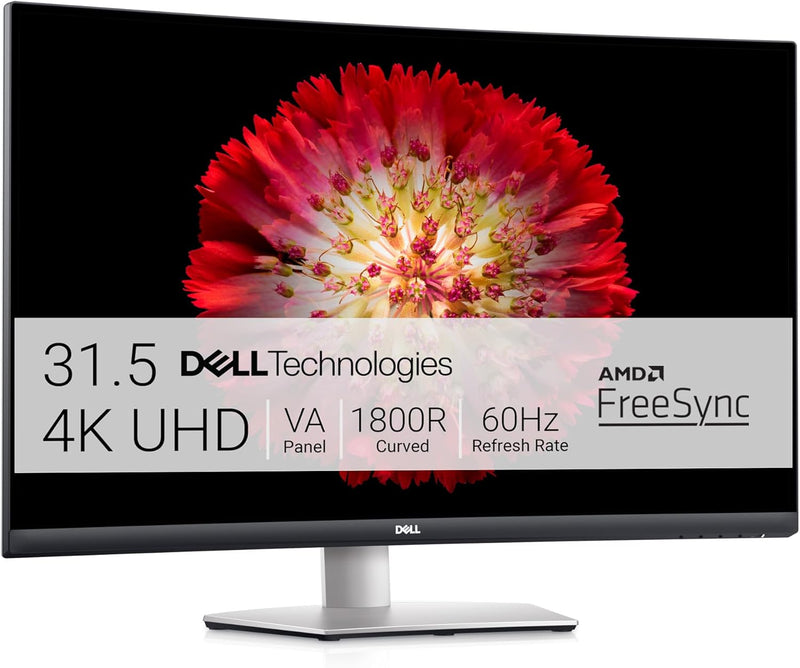


Dell
Dell S3221QS 32" Curved 4K Monitor
4KUHD3840 x 2160
Immerse Yourself in Stunning 4K Detail with the Dell S3221QS Monitor Elevate your viewing experience with the Dell S3221QS 32-inch Curved Monitor. Featuring an expansive 4K UHD display and built-in speakers tuned by Waves MaxxAudio, this monitor delivers both stunning visuals and immersive sound....
$728.45*
Check availability
*Price sourced from Amazon.com. Last updated:Aug 28, 2026.Price and availability are subject to change — details.
Affiliate Disclosure: As an Amazon Associate, Studio Supplies earns from qualifying purchases made through links on this page, at no additional cost to you. This helps support our editorial team.
Notice a mistake? Let Us Know
Overview
Immerse Yourself in Stunning 4K Detail with the Dell S3221QS Monitor
Elevate your viewing experience with the Dell S3221QS 32-inch Curved Monitor. Featuring an expansive 4K UHD display and built-in speakers tuned by Waves MaxxAudio, this monitor delivers both stunning visuals and immersive sound.
Specifications:
- Screen Size: 31.5 Inches
- Resolution: 4K UHD (3840 x 2160)
- Panel Type: VA
- Response Time: 4ms
- Refresh Rate: 60Hz
- Aspect Ratio: 16:9
- Brightness: 300 cd/m²
- Contrast Ratio: 3000:1
- Color Gamut: 90% DCI-P3, 99% sRGB
- Viewing Angle: 178° horizontal, 178° vertical
- Curvature: 1800R
- Features: AMD FreeSync, Flicker-Free, ComfortView (Low Blue Light)
- Speakers: 2 x 5W (Waves MaxxAudio)
- Ports: 2 x HDMI, 1 x DisplayPort
- USB Ports: 3 x USB 3.0
- VESA Mount: VESA Certified
- Adjustability: Pivot, Tilt, Swivel, Height Adjustment
- Color: Silver
Key Features
The three-sided ultrathin bezel design in 4K UHD (3840 x 2160) resolution lets you enjoy immersive viewing in incredible clarity and fine detail with 4 times the resolution of Full HD.Aspect ratio:16:9.Response time:4.0 milliseconds.Brightness : 300 cd/m2, Backlight Technology : WLED, Contrast Ratio : 3000:1..Brightness : 300 cd/m2. Contrast Ratio : 3000:1
Be in the action: The curved 1800R screen expands your field of vision and provides a wrap-around view for an immersive movie experience. Horizontal Viewing Angle: 178 degrees, Vertical Viewing Angle: 178 degrees
Easy on the eyes: This TÜV-certified monitor has a flicker-free screen with ComfortView, a feature that reduces harmful blue light emissions and optimizes eye comfort.
Adjust to your comfort: Pivot, tilt, swivel and adjust the height of your monitor for a comfortable setup all day long. Or choose from a variety of mounts and stands, including VESA, for even more flexibility.
Adjust to your comfort: Pivot, tilt, swivel and adjust the height of your monitor for a comfortable setup all day long. Choose from a variety of mounts and stands, including VESA, for even more flexibility.
Specifications
Screen Size
32 inches
Display Type
Curved
Resolution
4K UHD (3840 x 2160)
Aspect Ratio
16:9
Response Time
4.0 milliseconds
Brightness
300 cd/m2
Backlight Technology
WLED
Contrast Ratio
3000:1
Horizontal Viewing Angle
178 degrees
Vertical Viewing Angle
178 degrees
Bezel Design
Three-sided ultrathin
Curvature
1800R
Eye Comfort Certification
TÜV-certified (ComfortView, flicker-free)
Adjustability
Pivot, Tilt, Swivel, Height adjustment
Mounting Compatibility
VESA
Frequently Asked Questions
What is the resolution of the Dell S3221QS monitor?
The Dell S3221QS monitor features a 4K UHD (3840 x 2160) resolution, providing incredibly clear and detailed visuals.
What type of screen curvature does this monitor have?
It has an 1800R curved screen, which expands your field of vision for a more immersive viewing and movie experience.
Does this monitor offer features for eye comfort?
Yes, it is TÜV-certified with a flicker-free screen and ComfortView, a feature designed to reduce harmful blue light emissions and optimize eye comfort.
Can I adjust the monitor's position for ergonomic comfort?
Absolutely, you can pivot, tilt, swivel, and adjust the height of the monitor to achieve a comfortable setup for all-day use.
What is the response time of this monitor?
The Dell S3221QS has a response time of 4.0 milliseconds, contributing to smooth visuals.
What is the contrast ratio of the display?
This monitor offers a high contrast ratio of 3000:1, delivering deep blacks and bright whites for a vibrant image.
Is the monitor compatible with VESA mounts?
Yes, the monitor supports VESA compatibility, allowing for greater flexibility in choosing mounts and stands.
Related Products

