

Dell
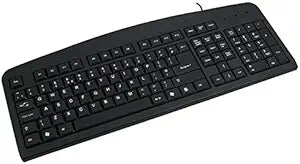
Dell TF692 Belgian Laptop Keyboard
A genuine Dell Belgian-layout replacement keyboard built for seamless multilingual typing on compatible laptops.
View price on Amazon
Affiliate Disclosure: As an Amazon Associate, Studio Supplies earns from qualifying purchases made through links on this page, at no additional cost to you. This helps support our editorial team.
Notice a mistake? Let Us Know
Overview
Experience Seamless Typing with this Reliable Keyboard
Introducing the Dell TF692 Keyboard. This Belgian layout keyboard ensures a comfortable and efficient typing experience. Perfect for both everyday use and professional tasks.
- Brand: Dell
- Model: TF692
- Layout: Belgian
- Part Number: NSK-D5A1A
- Revision: A02
Frequently Asked Questions
What laptop models is the Dell TF692 keyboard compatible with?
The TF692 (part number NSK-D5A1A, revision A02) is a Dell OEM replacement keyboard. Check your laptop's service manual or existing keyboard part number to confirm compatibility before purchasing.
What language layout does this keyboard use?
This keyboard uses a Belgian AZERTY layout, which differs from standard US QWERTY and includes dedicated characters for French and Dutch typing.
Is this keyboard backlit?
The product listing does not indicate backlighting. This appears to be a standard non-backlit replacement keyboard.
How difficult is it to install this replacement keyboard?
Installation typically involves removing a few screws and disconnecting a ribbon cable from the laptop motherboard. The exact process varies by laptop model, so consult your Dell service manual for step-by-step instructions.
Related Products


