

Dell
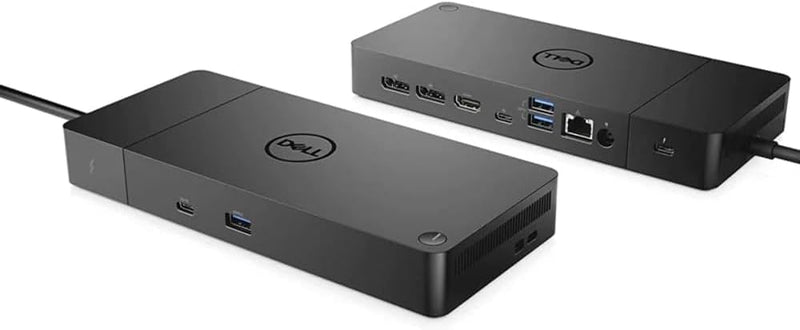
Dell WD19TBS Thunderbolt Dock 130W Power Delivery
Streamline Your Workspace with the Dell Thunderbolt Dock WD19TBSThe Dell Thunderbolt Dock WD19TBS provides ultimate connectivity and power delivery for Dell Commercial laptops and other Thunderbolt-compatible notebooks. Simplify your connections and optimize your workspace with this secure and ma...
$109.99*$136.00Save 19%
View on Amazon
✓ In Stock on Amazon.com
*Price sourced from Amazon.com. Last updated:Oct 23, 2026.Price and availability are subject to change — details.
Affiliate Disclosure: As an Amazon Associate, Studio Supplies earns from qualifying purchases made through links on this page, at no additional cost to you. This helps support our editorial team.
Notice a mistake? Let Us Know
Overview
Streamline Your Workspace with the Dell Thunderbolt Dock WD19TBS
The Dell Thunderbolt Dock WD19TBS provides ultimate connectivity and power delivery for Dell Commercial laptops and other Thunderbolt-compatible notebooks. Simplify your connections and optimize your workspace with this secure and manageable docking station.
Specifications:
- Compatibility: Compatible with Dell Commercial laptops and other manufacturers (HP, Lenovo) supporting Thunderbolt docking standards
- Power Delivery: 130w Power Delivery, 180w AC
- Connectivity: Thunderbolt connectivity for power, data, audio, and video
- Display Support: Up to three displays (single 5K or dual 4K monitors)
- Color: Black
- Hardware Interface: Thunderbolt
- Total USB Ports: 10
- Total HDMI Ports: 1
- Wattage: 130 watts
- Product Dimensions: 8 x 3.75 x 1.14 inches
- Item Weight: 3.08 pounds
Specifications
Brand
Dell
Model
WD19TBS Thunderbolt Dock
Power Delivery
130W
Connectivity Technology
Thunderbolt
Frequently Asked Questions
What is the power delivery capability of the Dell WD19TBS Thunderbolt Dock?
The Dell WD19TBS Thunderbolt Dock is capable of delivering 130W of power, which is sufficient for charging compatible laptops and powering various peripherals.
What type of connectivity does this docking station use?
This docking station utilizes Thunderbolt technology, providing high-speed data transfer and video output capabilities through a single cable connection to your laptop.
Is this docking station primarily for Dell laptops?
As a Dell-branded product, the WD19TBS Thunderbolt Dock is designed for optimal compatibility and performance with Dell laptops, though it may work with other Thunderbolt-enabled devices.
What is the benefit of using a docking station like the WD19TBS?
A docking station like this helps streamline your workspace by allowing you to connect multiple peripherals, monitors, and power your laptop through a single Thunderbolt cable.
What kind of ports are available on this docking station?
While the specific port configuration is not detailed, as a Thunderbolt dock, it typically includes various ports for display, USB accessories, and Ethernet connectivity.
Does this docking station come with a power adapter?
Given its 130W power delivery, it is expected to include its own power adapter for powering the dock and connected laptop, though specific inclusion details should be verified.
Can this dock support multiple external monitors?
Thunderbolt docks are generally capable of supporting multiple external monitors, but the exact number and resolution depend on the specific ports available and the connected laptop's capabilities.
Related Products


