

Eizo
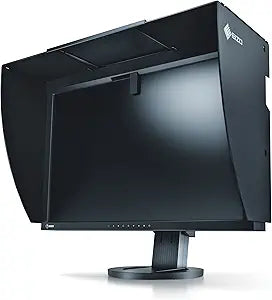
Eizo CG245W-BK ColorEdge 24" LCD Monitor 1920x1200
1920x1200
Professional-Grade Color Accuracy for Demanding Visual Tasks The Eizo ColorEdge CG245W is a 24-inch LCD monitor designed for professionals who require precise color accuracy. With a high resolution and wide color gamut, this monitor is ideal for graphic design, photography, and video editing. ...
Check availability
Affiliate Disclosure: As an Amazon Associate, Studio Supplies earns from qualifying purchases made through links on this page, at no additional cost to you. This helps support our editorial team.
Notice a mistake? Let Us Know
Overview
Professional-Grade Color Accuracy for Demanding Visual Tasks
The Eizo ColorEdge CG245W is a 24-inch LCD monitor designed for professionals who require precise color accuracy. With a high resolution and wide color gamut, this monitor is ideal for graphic design, photography, and video editing.
- Screen Size: 24-Inch
- Resolution: 1920 x 1200
- Refresh Rate: 86Hz
- Aspect Ratio: 16:10
- Response Time: 5ms
- Pixel Pitch: 0.27mm
- Contrast Ratio: 850:1
- Color: Black
Key Features
A built-in sensor is housed within the monitor's top bezel and swings down over the center top of the screen when calibration begins. This built-in sensor eliminates the need for a third-party calibration device and even operates in portrait mode
Using either the OSD menu or the bundled ColorNavigator software, you can schedule the ColorEdge CG245W to self-calibrate at a specific time and at specific intervals. You can even schedule calibration for outside of work hours when your computer is turned off and you are no longer present
Since the PC itself is not necessary for self-calibration, the ability to calibrate the monitor is not dependent on using an OS supported by the ColorNavigator software. Therefore, a calibrated ColorEdge CG245W can be used with Linux even though ColorNavigator currently does not support this OS
The ColorEdge CG245W can be correlated to the measurement results of an external calibration sensor. This is convenient if the ColorEdge CG245W is used in a work environment with other ColorEdge monitors and one measurement device must be used as a standard for all calibrating
The bundled ColorNavigator software makes calibration both simple and quick. Just input target values for brightness, white point and gamma. The built-in sensor directly utilizes the monitor's look-up table and creates an ICC profile within minutes
Specifications
Brand
Eizo
Model
CG245W-BK
Display Size
24 inches
Resolution
1920x1200
Calibration Sensor
Built-in
Software
ColorNavigator
Frequently Asked Questions
Does this monitor require an external device for calibration?
No, the Eizo CG245W-BK ColorEdge monitor features a built-in sensor located within the top bezel that automatically swings down to perform calibration, removing the need for third-party calibration devices.
Can the monitor be calibrated when the computer is turned off?
Yes, the ColorEdge CG245W can be scheduled to self-calibrate at specific times and intervals, even when your computer is turned off and you are not present.
Is the calibration software compatible with all operating systems?
The monitor's self-calibration ability does not depend on the OS supported by ColorNavigator software, meaning a calibrated unit can be used with operating systems like Linux even if ColorNavigator does not officially support them.
Can this monitor be integrated into a multi-monitor setup with other calibration standards?
Yes, the ColorEdge CG245W can be correlated to the measurement results of an external calibration sensor, which is useful for consistent calibration across multiple ColorEdge monitors in a professional environment.
How easy is it to set up calibration with the ColorNavigator software?
The included ColorNavigator software is designed to make calibration simple and quick; users only need to input target values for brightness, white point, and gamma, and the built-in sensor handles the rest.
Related Products


