



Epson
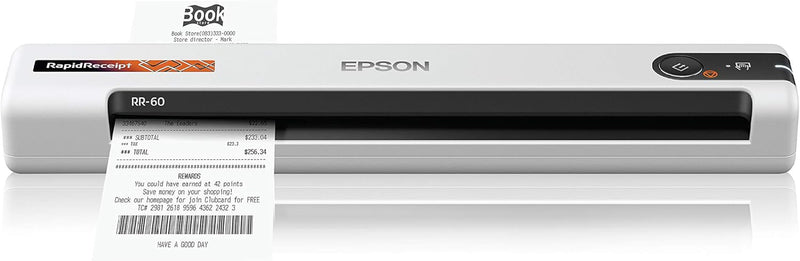
Epson B11B252204 RapidReceipt RR-60 Mobile Document Scanner
10 oz
Transform Paper into Smart Data with AI-Powered ScanningUnleash the power of AI with the Epson RapidReceipt RR-60 mobile business scanner. Driven by Epson ScanSmart AI PRO technology, you’ll quickly and intelligently convert scanned information into smart digital data – making your documents AI-r...
View price on Amazon
Affiliate Disclosure: As an Amazon Associate, Studio Supplies earns from qualifying purchases made through links on this page, at no additional cost to you. This helps support our editorial team.
Notice a mistake? Let Us Know
Overview
Transform Paper into Smart Data with AI-Powered Scanning
Unleash the power of AI with the Epson RapidReceipt RR-60 mobile business scanner. Driven by Epson ScanSmart AI PRO technology, you’ll quickly and intelligently convert scanned information into smart digital data – making your documents AI-ready
Specifications
- Technology: ScanSmart AI PRO Technology Intelligently convert and extract scanned information into smart digital data – making your documents AI-ready
- Receipts and Invoices: Quickly Organize Receipts and Invoices — Turn stacks of receipts and invoices into automatically categorized digital data
- Financial Software: Export to Financial Software² — Easily integrate organized receipt and invoice details into financial applications, such as QuickBooks and TurboTax
- Portability: Smallest and Lightest in Its Class³ ― USB-powered; weighs under 10 oz
- Scanning Speed: Fast Scanning — Scan up to 10 pages per minute⁴ in Automatic Feeding Mode
- PDF Compatibility: Create Searchable and Editable PDFs — Includes powerful PDF creation and editing software for Windows and Mac
- Resolution: HyperClear Technology — High-resolution optics produce enhanced scans of each page – including auto cropping, background removal and more
- Cloud Compatible: Scan to Cloud⁵ — Such as OneDrive, Dropbox and Google Drive from your PC, Mac, or via the Epson Smart Panel mobile app
- Scanning Versatility: Versatile Scanning — For everyday receipts, invoices, documents, business and ID cards, and long pages up to 8.5" x 72"
- Filing: Save Time with Automatic File Naming — Recognizes receipts versus invoices versus standard documents and integrates into file names
Key Features
ScanSmart AI PRO Technology — Intelligently convert and extract scanned information into smart digital data – making your documents AI-ready
Quickly Organize Receipts and Invoices — Turn stacks of receipts and invoices into automatically categorized digital data
Export to Financial Software² — Easily integrate organized receipt and invoice details into financial applications, such as QuickBooks and TurboTax
Smallest and Lightest in Its Class³ ― USB-powered; weighs under 10 oz
Fast Scanning — Scan up to 10 pages per minute⁴ in Automatic Feeding Mode
Create Searchable and Editable PDFs — Includes powerful PDF creation and editing software for Windows and Mac
HyperClear Technology — High-resolution optics produce enhanced scans of each page – including auto cropping, background removal and more
Scan to Cloud⁵ — Such as OneDrive, Dropbox and Google Drive from your PC, Mac, or via the Epson Smart Panel mobile app
Versatile Scanning — For everyday receipts, invoices, documents, business and ID cards, and long pages up to 8.5" x 72"
Save Time with Automatic File Naming — Recognizes receipts versus invoices versus standard documents and integrates into file names
Specifications
Technology
ScanSmart AI PRO Technology, HyperClear Technology
Power Source
USB-powered
Weight
Under 10 oz
Scanning Speed (Automatic Feeding Mode)
Up to 10 pages per minute
PDF Software Compatibility
Windows and Mac
Scan to Cloud Services
OneDrive, Dropbox, Google Drive (via PC, Mac, or Epson Smart Panel app)
Versatile Scanning
Receipts, invoices, documents, business and ID cards, long pages up to 8.5" x 72"
Automatic File Naming
Recognizes receipts, invoices, standard documents
Frequently Asked Questions
What types of documents can this scanner handle?
This scanner is versatile, capable of handling everyday receipts, invoices, general documents, business and ID cards, and even long pages up to 8.5" x 72".
Does the scanner offer any intelligent features for organizing documents?
Yes, it utilizes ScanSmart AI PRO Technology to intelligently convert and extract scanned information, automatically categorizing receipts and invoices into smart digital data for quick organization.
Can I export scanned data to financial software?
Absolutely, the scanner allows you to easily integrate organized receipt and invoice details into financial applications, including popular programs like QuickBooks and TurboTax.
Is this document scanner portable?
Yes, it is described as the smallest and lightest in its class, weighing under 10 oz, and is USB-powered, making it highly portable for on-the-go use.
What is the scanning speed of this device?
The scanner offers fast scanning capabilities, able to process up to 10 pages per minute when using its Automatic Feeding Mode.
Does it create searchable PDFs?
Yes, it includes powerful PDF creation and editing software for both Windows and Mac, which allows for the generation of searchable and editable PDF documents.
Can I scan documents directly to cloud services?
Yes, you can scan directly to cloud platforms such as OneDrive, Dropbox, and Google Drive from your PC, Mac, or through the Epson Smart Panel mobile application.
Related Products


