

Epson
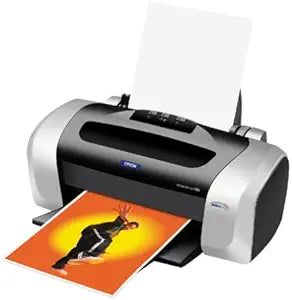
Epson C11C573071 Stylus C66 Inkjet Printer
Get Vibrant, Long-Lasting Prints with Epson Stylus C66 The Epson Stylus C66 printer delivers high-quality prints with DURABrite inks that are water-, smudge-, and light-resistant. Enjoy sharp text and vibrant colors for all your printing needs. Print Resolution: 5760x1440 optimized dpi ...
$389.99*
Check availability
*Price sourced from Amazon.com. Last updated:Aug 31, 2026.Price and availability are subject to change — details.
Affiliate Disclosure: As an Amazon Associate, Studio Supplies earns from qualifying purchases made through links on this page, at no additional cost to you. This helps support our editorial team.
Notice a mistake? Let Us Know
Overview
Get Vibrant, Long-Lasting Prints with Epson Stylus C66
The Epson Stylus C66 printer delivers high-quality prints with DURABrite inks that are water-, smudge-, and light-resistant. Enjoy sharp text and vibrant colors for all your printing needs.
- Print Resolution: 5760x1440 optimized dpi
- Black Text Print Speed: Up to 17ppm
- Borderless Printing: Yes, 4x6"
- Ink Type: DURABrite Inks
Key Features
Optimized resolution up to 5,760 dpi for sharp photos
Up to 17 ppm monochrome, 9 ppm color print speed
Individual DURABrite ink cartridges for cost-effective quality
32 MB RAM buffer; manual 2-sided printing
USB interface; Epson PhotoQuicker simplifies photo printing
Specifications
Optimized Resolution
Up to 5,760 dpi
Monochrome Print Speed
Up to 17 ppm
Color Print Speed
Up to 9 ppm
Ink Cartridge Type
Individual DURABrite
RAM Buffer
32 MB
Duplex Printing
Manual 2-sided
Interface
USB
Included Software
Epson PhotoQuicker
Frequently Asked Questions
What is the maximum resolution for photo printing on the Epson Stylus C66?
The Epson Stylus C66 Inkjet Printer offers an optimized resolution of up to 5,760 dpi for sharp photo prints.
How fast can this printer print in monochrome and color?
It can print up to 17 pages per minute in monochrome and up to 9 pages per minute in color.
Does this printer use individual ink cartridges?
Yes, it uses individual DURABrite ink cartridges, which allows for cost-effective replacement of only the color that has run out.
Is two-sided printing an option with this printer?
This printer supports manual 2-sided printing, meaning you will need to flip the paper to print on the second side.
What type of interface does the Epson Stylus C66 use?
The printer connects via a USB interface.
Does it come with any software to help with photo printing?
Yes, it includes Epson PhotoQuicker, which simplifies the process of printing photos.
Related Products


