

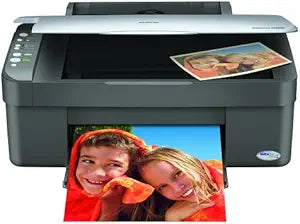
Epson
Epson C11C612001 Stylus CX3810 All-In-One Printer, Copier, Scanner
Print, copy, and scan at up to 18 PPM with DURABrite Ultra Ink that resists water, smearing, and fading.
$174.24*
View on Amazon
✓ In Stock on Amazon.com
*Price sourced from Amazon.com. Last updated:Aug 29, 2026.Price and availability are subject to change — details.
Affiliate Disclosure: As an Amazon Associate, Studio Supplies earns from qualifying purchases made through links on this page, at no additional cost to you. This helps support our editorial team.
Notice a mistake? Let Us Know
Overview
Key Features
Produces borderFree photos in popular frame-ready sizes
Speeds through black text up to 18 PPM and color up to 9 ppm
Restores old faded color photos
PC-free black and white or color copying
Convenient individual ink cartridges
Specifications
Functions
Print, Copy, Scan
Ink Type
DURABrite Ultra Ink
Print Speed (Black)
Up to 18 PPM
Print Speed (Color)
Up to 9 PPM
Photo Printing
BorderFree, frame-ready sizes
Ink Cartridges
Individual per color
Copy Mode
PC-free black and white or color
Model
C11C612001
Frequently Asked Questions
What ink system does the CX3810 use, and can I replace individual colors?
The CX3810 uses Epson's DURABrite Ultra Ink with individual ink cartridges per color. This means when one color runs out, you replace only that cartridge — not a combined unit — reducing waste and ongoing cost.
Can I copy documents without connecting to a PC?
Yes. The CX3810 supports standalone PC-free copying in both black-and-white and color directly from the unit's controls, without any computer connection required.
What is the maximum print speed for black text?
Up to 18 pages per minute for black text and up to 9 pages per minute for color — standard office output rates that handle moderate daily print volumes without queueing delays.
Does the printer support borderless photo printing?
Yes. The CX3810 prints borderless photos in popular frame-ready sizes, making it suitable for home photo printing without requiring post-print trimming.
What does the photo restoration feature actually do?
The CX3810 includes a color restoration function that analyzes faded or discolored original photos placed on the scanner bed and prints a corrected copy with enhanced color balance — no PC software required for basic restoration.
Related Products


