

Epson
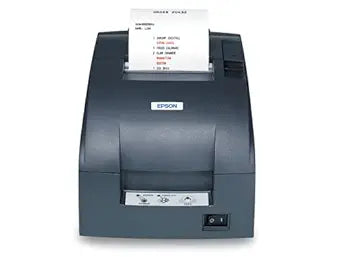
Epson C31C513A8901 TM-U220A Dot Matrix Receipt Printer (2-Pack)
Reliable Receipt Printing with the Epson TM-U220A Dot Matrix Printer The Epson TM-U220A is a robust and reliable dot matrix receipt printer designed for fast and efficient printing. Featuring a 9-pin printhead, USB interface, and autocutter functionality, this printer is ideal for retail, hospita...
Check availability
Affiliate Disclosure: As an Amazon Associate, Studio Supplies earns from qualifying purchases made through links on this page, at no additional cost to you. This helps support our editorial team.
Notice a mistake? Let Us Know
Overview
Reliable Receipt Printing with the Epson TM-U220A Dot Matrix Printer
The Epson TM-U220A is a robust and reliable dot matrix receipt printer designed for fast and efficient printing. Featuring a 9-pin printhead, USB interface, and autocutter functionality, this printer is ideal for retail, hospitality, and other point-of-sale applications. Comes in a pack of two.
Specifications:
- Print Method: 9 pin Dot Matrix
- Interface: USB interface
- Color: Dark Gray color
- Features: Autocutter and take up journal
Key Features
9 pin
USB interface
Dark Gray color
Autocutter and take up journal
Specifications
Printing Technology
Dot Matrix
Pin Count
9 pin
Interface
USB
Color
Dark Gray
Features
Autocutter, Take up journal
Frequently Asked Questions
What type of printing technology does the Epson TM-U220A use?
The Epson TM-U220A uses 9-pin dot matrix printing technology, known for its reliability and ability to print carbon copies.
What connectivity options are available for this receipt printer?
This receipt printer features a USB interface, allowing for direct and straightforward connection to a host system.
Does the Epson TM-U220A printer include an autocutter?
Yes, the Epson TM-U220A comes equipped with an autocutter, which automatically cuts receipts after printing for convenience.
What color is the Epson C31C513A8901 printer?
This specific model of the Epson receipt printer is available in a Dark Gray color.
Can this printer be used for a take-up journal?
Yes, the Epson TM-U220A includes a take-up journal feature, which is useful for maintaining a physical record of all printed transactions.
Is this printer suitable for printing logos or complex graphics?
While capable of printing, its 9-pin dot matrix technology is primarily designed for text and basic graphics, not high-resolution images.
Related Products


