

Epson
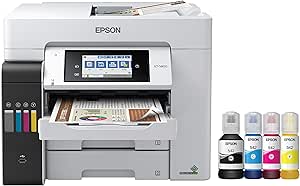
Epson ET-5800 EcoTank Pro Wireless All-in-One Printer
Unleash Productivity with Cartridge-Free PrintingIntroducing the Epson EcoTank Pro ET-5800, a wireless all-in-one supertank printer designed for high-speed, cartridge-free printing. This printer features easy-to-fill, supersized ink tanks, saving you up to 80% on ink costs compared to standard-ca...
$749.99*
View on Amazon
✓ In Stock on Amazon.com
*Price sourced from Amazon.com. Last updated:Aug 30, 2026.Price and availability are subject to change — details.
Affiliate Disclosure: As an Amazon Associate, Studio Supplies earns from qualifying purchases made through links on this page, at no additional cost to you. This helps support our editorial team.
Notice a mistake? Let Us Know
Overview
Unleash Productivity with Cartridge-Free Printing
Introducing the Epson EcoTank Pro ET-5800, a wireless all-in-one supertank printer designed for high-speed, cartridge-free printing. This printer features easy-to-fill, supersized ink tanks, saving you up to 80% on ink costs compared to standard-capacity color laser toner cartridges. Experience vibrant, borderless prints up to 8.5" x 14" with Epson DURABrite pigment-based ink. With two 250-sheet front paper trays, a rear specialty-paper feed, a 4.3" color touchscreen, and voice-activated printing, the ET-5800 is built for efficiency and convenience.
Specifications:
- Brand: Epson
- Model: ET-5800
- Type: Wireless Color All-in-One Supertank Printer
- Functions: Print, Scan, Copy, Fax, Ethernet
- Printing Technology: PrecisionCore Heat-Free Technology
- Print Speed: Up to 25 ISO ppm black
- Borderless Printing: Up to 8.5" x 14"
- Ink Type: Epson DURABrite pigment-based ink
- Paper Capacity: Two 250-sheet front paper trays, rear specialty-paper feed
- Display: 4.3" color touchscreen
- Connectivity: Wireless, Ethernet
- Voice-Activated Printing: Yes
Specifications
Printer Type
All-in-One
Ink System
EcoTank Pro
Connectivity
Wireless
Frequently Asked Questions
What does "EcoTank Pro" mean for this printer?
"EcoTank Pro" indicates that this printer uses a refillable ink tank system instead of traditional cartridges, typically offering lower cost per page and higher ink yields, with professional-grade features.
Is the Epson ET-5800 capable of printing wirelessly?
Yes, the product title specifies it as a "Wireless All-in-One Printer," confirming its capability to connect and print without physical network cables.
What are the main functions of an "All-in-One Printer"?
An "All-in-One Printer" usually combines printing, scanning, copying, and often faxing capabilities into a single device, providing versatile functionality for home or office use.
Does this printer use ink cartridges or bottles?
As an EcoTank printer, it uses ink bottles to refill integrated ink tanks, which is a key differentiator from cartridge-based printers.
What kind of environment is this printer designed for?
The "Pro" in EcoTank Pro suggests it is designed for environments requiring robust performance and potentially higher print volumes, such as small businesses or busy home offices.
Are specific print speeds or resolutions available for this model?
The provided product title does not detail specific print speeds or resolutions, so it is advisable to consult the full product specifications for these details.
Is initial setup of the EcoTank system more complex than a cartridge printer?
While the ink tanks need to be filled, the process is generally straightforward, though it differs from the simple insertion of cartridges.
Related Products


