



Epson
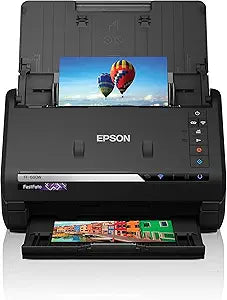
Epson FF-680W FastFoto Wireless Photo & Document Scanner
680W
At 80 prints per minute, the Epson FF-680W turns a shoebox of aging photos into a searchable digital archive before the afternoon is over.
$529.99*
View on Amazon
✓ In Stock on Amazon.com
*Price sourced from Amazon.com. Last updated:Oct 09, 2026.Price and availability are subject to change — details.
Affiliate Disclosure: As an Amazon Associate, Studio Supplies earns from qualifying purchases made through links on this page, at no additional cost to you. This helps support our editorial team.
Notice a mistake? Let Us Know
Overview
Key Features
Scanning Speed: Photo Scan Speed (4" x 6" landscape): 80 ppm/160 ipm2 (300 dpi color) Document Scan Speed (Letter size): 45 ppm/90 ipm4 (300 dpi color)
Specifications
Photo Scan Speed (4x6, 300 dpi color)
80 ppm / 160 ipm
Document Scan Speed (Letter, 300 dpi color)
45 ppm / 90 ipm
Connectivity
Wireless (Wi-Fi)
Brand
Epson
Model
FF-680W
ASIN
B09K5NL5JH
Frequently Asked Questions
What does 80 ppm/160 ipm actually mean in practical scanning throughput?
Ppm (pages per minute) is the simplex rate — one side of the sheet. Ipm (images per minute) counts both sides in a duplex pass. At 80 ppm/160 ipm for 4x6 photos at 300 dpi color, you can process a 500-photo stack in approximately six to seven minutes of active scanning — a throughput benchmark that no flatbed scanner approaches.
Does wireless connectivity affect scan quality or introduce latency?
Wireless transmission handles the data transfer to your computer after the scan is complete — it does not affect the scan itself, which is processed internally. The practical impact is the ability to place the scanner anywhere on your network without a USB tether, but for large batch jobs, a direct USB connection will deliver faster transfer of completed scan files.
What is the maximum scan resolution the FF-680W supports?
The product specifications provided do not detail the maximum optical resolution beyond the rated 300 dpi color scan speed. For archival-grade photo digitization, verify the scanner's maximum optical resolution in Epson's full spec sheet before purchase if high-resolution output is a primary requirement.
Can the FF-680W handle documents as well as photos?
Yes — at 45 ppm/90 ipm for letter-size documents at 300 dpi color, it functions as a capable document scanner alongside its photo scanning role. This dual-mode capability means a single device handles both archival photo projects and ongoing paper document workflows.
What software does the FF-680W include for organizing scanned photos?
Epson bundles photo management software with the FF-680W designed to assist with organizing, tagging, and sharing digitized images. Refer to Epson's included software documentation for the specific application name and feature set, as software bundles can change with firmware and driver updates.
Related Products


