



Epson
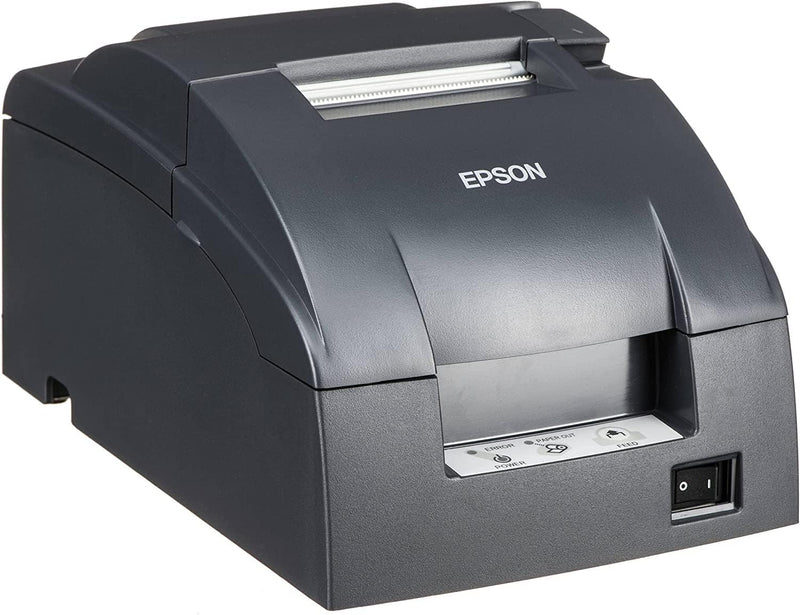
Epson TM-U220B POS Impact Receipt Printer Ethernet Auto-Cutter
Streamline Operations with the Epson TM-U220B POS Printer The Epson TM-U220B is a compact and reliable dot matrix printer ideal for receipt and kitchen label printing in Point of Sale (POS) environments. Engineered for high-speed throughput and compatibility with mobile POS systems, this printer ...
$435.25*
View on Amazon
✓ In Stock on Amazon.com
*Price sourced from Amazon.com. Last updated:Sep 04, 2026.Price and availability are subject to change — details.
Affiliate Disclosure: As an Amazon Associate, Studio Supplies earns from qualifying purchases made through links on this page, at no additional cost to you. This helps support our editorial team.
Notice a mistake? Let Us Know
Overview
Streamline Operations with the Epson TM-U220B POS Printer
The Epson TM-U220B is a compact and reliable dot matrix printer ideal for receipt and kitchen label printing in Point of Sale (POS) environments. Engineered for high-speed throughput and compatibility with mobile POS systems, this printer offers Ethernet connectivity and an auto-cutter for efficient operation.
Specifications:
- Print Method: 9-pin, Serial Impact Dot Matrix
- Print Resolution: 203 x 203 dpi
- Print Speed: * 4.7 lps (at 40 columns, 16 cpi)
- Print Fonts: 7 x 9 / 9 x 9
- Column Capacity: 42/42 or 33/35 columns
- Character Size: 1.2 x 3.1 / 1.6 x 3.1 (W x H mm)
- Characters Per Inch: 17.8/16 or 14.5/13.3 cpi
- Paper Dimensions: * 57.5 ± 0.5 (W) x 83mm diameter
- Paper Thickness: 0.06 to 0.085 mm
- Copy Capability: One original and one copy
- Inked Ribbon: ERC-38 (black, black/red)
- Ribbon Life: * Black: 3,000,000 characters
- Interfaces: DK Port, Ethernet 10/100Base-T/TX
- Data Buffer: 40 bytes or 4KB
- Power: 24 VDC ± 7%
- Color: Epson Dark Gray (EDG)
- OS Support: Various Windows versions (including Embedded and POSReady)
- Dimensions (W x D x H): 6.29 x 9.76 x 5.45" (160 x 248 x 138.5mm)
- Weight: 2.5 kg (5.5 lbs)
- Special Feature: Ethernet
- Printing Technology: Dot Matrix
Key Features
Epson's mPOS-friendly TM-U220PB impact receipt and kitchen/bar printers are compact, reliable and optimized for high-speed throughput. They are designed to work right out of the box with mobile POS applications and can print directly from iOS, Android and Windows devices: Dot Matrix Receipt Printer, Epson TMU220PB, Ethernet Interface, 4 Lines Per Second, Auto-cutter, MPOS, Auto-Status, DHCP Enabled.
This printer comes with DP Port and Ethernet connection in the back.
High-speed printing through logical seeking control6,0 lps (30cpl) / 4,7; Two-color printing for highlighting offers or order exceptions.
Right-side-up printing for kitchen orders; Accommodates paper widths of 58, 70 or 76mm; Drop-in paper load; Autocutter included.
What's in the box: TM-U220PB printer; User manual; Ribbon cassette; Power switch cover; Paper roll; Adaptor C with AC cord.
Specifications
Printer Type
Dot Matrix Receipt Printer
Interface
Ethernet, DP Port
Print Speed
6.0 lps (30cpl) / 4.7 lps
Auto-cutter
Included
Paper Width Compatibility
58, 70, or 76mm
Connectivity
iOS, Android, Windows devices
Features
Two-color printing, Right-side-up printing, Drop-in paper load
Frequently Asked Questions
What type of printer is the Epson TM-U220B?
The Epson TM-U220B is a dot matrix impact receipt and kitchen/bar printer, known for high-speed throughput.
How does this printer connect to a point-of-sale system?
This printer features an Ethernet interface and a DP Port, designed to work with mobile POS applications on iOS, Android, and Windows devices.
Can this printer print in more than one color?
Yes, it supports two-color printing, which can be used to highlight special offers or order exceptions.
Does the Epson TM-U220B include an auto-cutter?
Yes, an auto-cutter is included, providing convenience for automatically cutting receipts or orders.
What paper widths can this printer accommodate?
The printer is versatile and can accommodate paper widths of 58mm, 70mm, or 76mm.
Is it easy to load paper into this printer?
Yes, it features a drop-in paper load mechanism, which simplifies and speeds up the process of changing paper rolls.
Related Products


