



Epson
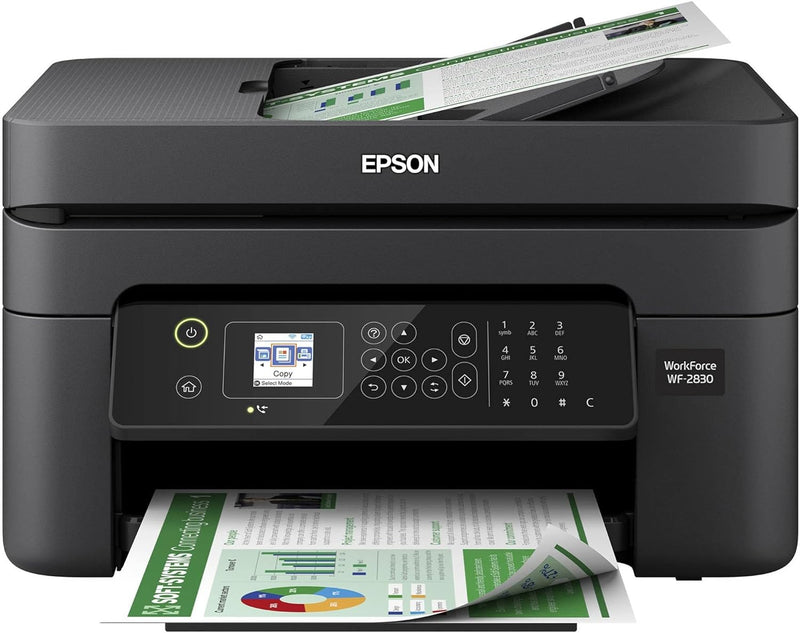
Epson WF-2830 Wireless All-in-One Color Printer
Versatile Home Office Solution: Epson Workforce WF-2830 All-in-One Printer The Epson Workforce WF-2830 is a wireless all-in-one printer designed for efficient home office use. Offering print, scan, copy, and fax capabilities, this printer delivers professional-quality results with easy wireless c...
$119.99*$133.99Save 10%
Check availability
*Price sourced from Amazon.com. Last updated:Aug 29, 2026.Price and availability are subject to change — details.
Affiliate Disclosure: As an Amazon Associate, Studio Supplies earns from qualifying purchases made through links on this page, at no additional cost to you. This helps support our editorial team.
Notice a mistake? Let Us Know
Overview
Versatile Home Office Solution: Epson Workforce WF-2830 All-in-One Printer
The Epson Workforce WF-2830 is a wireless all-in-one printer designed for efficient home office use. Offering print, scan, copy, and fax capabilities, this printer delivers professional-quality results with easy wireless connectivity and convenient features like automatic 2-sided printing and voice-activated control.
Specifications:
- Functions: Print, Copy, Scan, Fax
- Printing Technology: Inkjet
- Wireless Connectivity: Wi-Fi
- Automatic 2-Sided Printing: Yes
- Display: 1.4" Color Display
- Voice-Activated Printing: Alexa, Siri, Google Assistant
- Max. Resolution: 5760 x 1440 DPI
- Scanner Type: Sheetfed
- Max Input Sheet Capacity: 100
- Print Media: Paper (plain)
- Ink Colors: Black, Cyan, Magenta, Yellow
- Dimensions: 6.81"D x 7.2"W x 4.84"H
- Weight: 11.5 pounds
Key Features
Professional-Quality Home Office Printing — Epson’s leading-edge printing technology delivers sharp text and vibrant color graphics
Stress-Free Setup and Operation — Features a color display for effortless navigation, plus easy installation and operation through your smartphone or tablet using the Epson Smart Panel app (1)
Engineered for Reliability — Consistently delivers high-quality prints with heat-free technology and a permanent printhead designed to last the life of the printer
Convenient Connectivity — Supports easy wireless connections and printing from Android or iOS devices (2)
Efficient, Economical Design — Automatic 2-sided printing helps you save paper and reduce paper waste
Easy, Affordable Color Printing — Individual ink cartridges make it easy to only replace the ink you need
Hands-Free, Voice-Activated Printing — Easily print on-the-go using Alexa, Siri and Google Assistant (3)
Versatile Functionality — Create searchable PDFs and more with included Epson ScanSmart scanning software
Epson Printing System Is Designed to Be Used Exclusively with Epson Genuine Cartridges — Use of non-genuine ink could cause damage not covered under the printer’s limited warranty
Specifications
Model
WF-2830
Type
Wireless All-in-One Color Printer
Printing Technology
Epson Heat-Free Technology
Printhead
Permanent
Connectivity
Wireless, Android/iOS Device Printing
Control
Color Display, Epson Smart Panel App
Printing Features
Automatic 2-sided printing
Ink System
Individual ink cartridges
Scanning Software
Epson ScanSmart
Voice Assistant Compatibility
Alexa, Siri, Google Assistant
Frequently Asked Questions
What kind of print quality can I expect from the Epson WF-2830?
The Epson WF-2830 utilizes Epson’s leading-edge printing technology to deliver professional-quality prints with sharp text and vibrant color graphics.
How easy is it to set up and operate this printer?
This printer offers stress-free setup and operation, featuring a color display for effortless navigation and easy installation via the Epson Smart Panel app on your smartphone or tablet.
Does this printer support wireless printing from mobile devices?
Yes, the Epson WF-2830 supports easy wireless connections and printing directly from Android or iOS devices.
Can I print on both sides of the paper automatically with this printer?
Yes, it features automatic 2-sided printing, which helps to save paper and reduce paper waste.
Does the Epson WF-2830 use individual ink cartridges?
Yes, it uses individual ink cartridges, allowing you to replace only the specific color that runs out, which can be more economical.
Is voice-activated printing available with this model?
Yes, you can easily print hands-free using voice commands with Alexa, Siri, and Google Assistant.
What software is included for scanning functions?
The printer comes with Epson ScanSmart scanning software, which enables versatile functionality such as creating searchable PDFs.
Is it recommended to use non-genuine ink cartridges with this printer?
No, the Epson printing system is designed exclusively for use with Epson Genuine Cartridges, and using non-genuine ink could cause damage not covered under the printer’s limited warranty.
Related Products


