

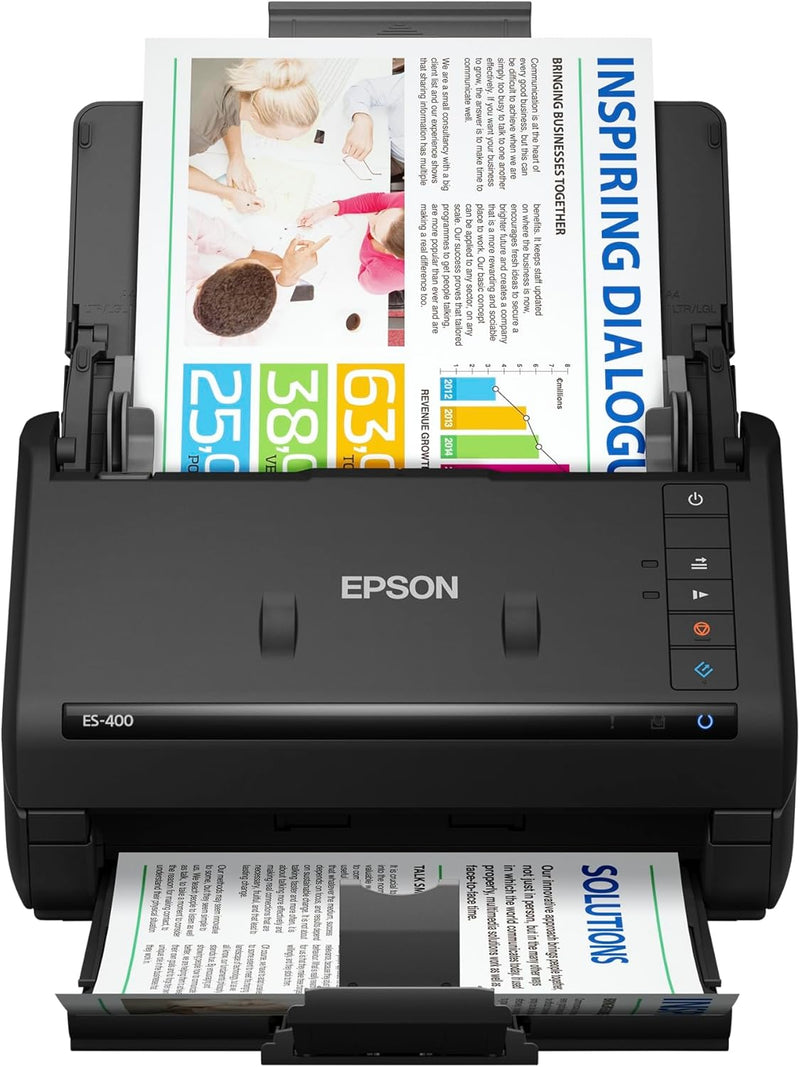


Epson
Epson WorkForce ES-400 Color Duplex Document Scanner ADF
USB 3.0
Digitize Documents Quickly with Epson WorkForce ES-400The Epson WorkForce ES-400 duplex document scanner is designed to streamline your workflow and keep you organized. Perfect for both home and office environments, this scanner offers fast speeds and versatile scanning options. Specifications: ...
$386.95*
View on Amazon
✓ In Stock on Amazon.com
*Price sourced from Amazon.com. Last updated:Oct 08, 2026.Price and availability are subject to change — details.
Affiliate Disclosure: As an Amazon Associate, Studio Supplies earns from qualifying purchases made through links on this page, at no additional cost to you. This helps support our editorial team.
Notice a mistake? Let Us Know
Overview
Digitize Documents Quickly with Epson WorkForce ES-400
The Epson WorkForce ES-400 duplex document scanner is designed to streamline your workflow and keep you organized. Perfect for both home and office environments, this scanner offers fast speeds and versatile scanning options.
Specifications:
- Scanning Speed: Up to 35 ppm/70 ipm
- Auto Document Feeder: 50-page capacity
- Connectivity: Super Speed USB 3.0, optional Network Interface Unit (RJ 45, 10BaseT/100BaseTX)
- Operating Systems: Windows 7, 8/8.1, 10. Mac OS X 10.6.8 10.11.x
- Software: Epson ScanSmart Software
- OCR: Built-in Nuance Optical Character Recognition
- Maximum Resolution: 1200 dpi interpolated
- Color Depth: 24 bits
- Greyscale Depth: 16-bit input/8-bit output
- Power Consumption: 17 watts
- Dimensions (D x W x H): 12.6" x 11.6" x 12.3"
- Weight: 8.1 Pounds
- Supported Media Type: Photo, Receipt, Business Card, Paper
Key Features
Get organized in a snap scan upto 35 ppm/70 ipm (1); Single Step Technology captures both sides in one pass
Easily scan stacks of paper robust 50 page Auto Document Feeder; Scan business/ID cards, receipts and more. Operating Systems Windows 7, 8/8.1, 10. Mac OS X 10.6.8 10.11.x
Powerful software included easy scanning with intuitive Epson ScanSmart Software (2); Preview, email, upload and more; Automatic file naming and object recognition save time
Compatible with most software the included TWAIN driver allows for easy connection to most document management software; Standard Connectivity Super Speed USB 3.0, optional Network Interface Unit (RJ 45, 10BaseT/100BaseTX)
Built in Nuance Optical Character Recognition (OCR) create searchable PDFs and editable Word and Excel files. Maximum Resolution: 1200 dpi interpolated
Easy sharing and collaboration email or upload to popular cloud storage services(2) such as Dropbox, Evernote, Google Drive
Intelligent color and image adjustments auto crop, blank page and background removal with Epson Image Processing Technology
Reliable paper feeding system ultrasonic double feed detection prevents missing pages; Also features dynamic skew correction
Optional Network Interface Unit: Available(3) share the scanner across your network (unit sold separately)
Specifications
Scanning Speed
Up to 35 ppm/70 ipm
Document Feeder Capacity
50 pages (ADF)
Scanning Technology
Single Step Technology
Maximum Resolution
1200 dpi interpolated
Connectivity
Super Speed USB 3.0, Optional Network Interface Unit (RJ 45, 10BaseT/100BaseTX)
Included Software
Epson ScanSmart Software, Nuance Optical Character Recognition (OCR)
Driver Compatibility
TWAIN
Supported OS
Windows 7, 8/8.1, 10; Mac OS X 10.6.8 - 10.11.x
Frequently Asked Questions
How fast can the Epson WorkForce ES-400 scan documents?
The Epson WorkForce ES-400 can scan at speeds of up to 35 pages per minute (ppm) or 70 images per minute (ipm), offering efficient document processing.
Can this scanner scan both sides of a document simultaneously?
Yes, it features Single Step Technology, which allows it to capture both sides of a document in one pass, enhancing scanning efficiency.
What kind of documents can the Auto Document Feeder handle?
The robust 50-page Auto Document Feeder is designed to easily scan stacks of paper, including business/ID cards, receipts, and other various documents.
Is software included to help with scanning and organization?
Yes, the scanner includes intuitive Epson ScanSmart Software for easy scanning, previewing, emailing, uploading, and also features automatic file naming and object recognition to save time.
Can I create searchable PDF files with this scanner?
Absolutely, the Epson WorkForce ES-400 has built-in Nuance Optical Character Recognition (OCR) which enables the creation of searchable PDFs and editable Word and Excel files.
Is this scanner compatible with network sharing?
An optional Network Interface Unit (RJ 45, 10BaseT/100BaseTX) is available separately, allowing you to share the scanner across your network.
Does the scanner help correct image imperfections automatically?
Yes, it incorporates intelligent color and image adjustments, including auto crop, blank page, and background removal, through Epson Image Processing Technology.
Related Products


