



FRWRJQ
FRWRJQ WiFi Extender with Ethernet Port and WPS Setup
Two high-gain antennas and an eight-second WPS pairing aimed at wiping out the dead zones your router cannot reach
$21.99*
View on Amazon
✓ In Stock on Amazon.com
*Price sourced from Amazon.com. Last updated:Oct 24, 2026.Price and availability are subject to change — details.
Affiliate Disclosure: As an Amazon Associate, Studio Supplies earns from qualifying purchases made through links on this page, at no additional cost to you. This helps support our editorial team.
Notice a mistake? Let Us Know
Overview
Key Features
✅Extended wireless coverage - Boosts your WiFi Range and Connects up to 80 Devices such as Smartphones,Laptops, Tablets, Speakers, IP Cameras, IoT Devices, Alexa Devices and more.
✅Say Goodbye to WiFi Dead Zone - Extend the WiFi range to hard-to-reach areas, with 2 external High-gain antennas providing strong and reliable network in your home.
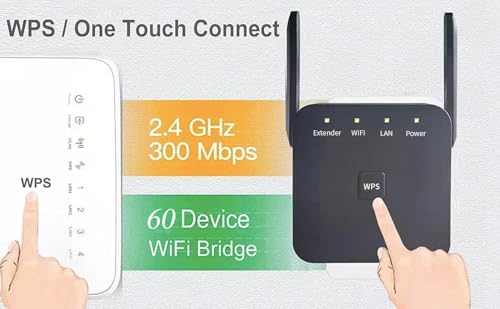
✅One touch connection - Press the WPS Button on routers then press WPS on Wifi Extender to make fast connection.
✅Plug and Play - Simply plug WiFi repeater into any outlet, then click WPS button on the repeater and on your router, then you can move the WiFi repeater anywhere.
✅Easy to Setup - Just press the WPS button on the WiFi extender and router, you can extend the wireless coverage within 8s. Or easy set up by smartphone. Smart signal lights help to find the best location for optimal WiFi coverage.
Specifications
Brand
FRWRJQ
Manufacturer
Shenzhen Century Xinyang Technology Co., Ltd.
Device Type
WiFi Extender / Repeater / Booster
Advertised Coverage
Up to 10,000 sq. ft.
Supported Devices
Up to 80
Antennas
2 external high-gain
Wired Port
Ethernet port
Setup Method
WPS button or smartphone
Setup Time
Approximately 8 seconds via WPS
Power
Plug-in wall outlet
Position Indicator
Smart signal lights
Frequently Asked Questions
How does the FRWRJQ extender connect to my existing router?
It pairs over WPS. You press the WPS button on your router, then the WPS button on the extender, and the two link in about eight seconds. A smartphone setup option is also available.
Can I connect a wired device to this extender?
Yes. It includes an Ethernet port, so you can hardwire a device such as a TV, console, or desktop in a room that sits far from your main router.
Is the 10000 sq.ft coverage figure realistic for my home?
Treat it as a best-case ceiling. Actual reach depends on your walls, floors, and interference, so real-world coverage in a typical home will be less than the advertised maximum.
How many devices can connect to it at once?
The listing states support for up to 80 devices, including smartphones, laptops, tablets, speakers, IP cameras, and other smart-home gear, though performance can vary as more devices join.
Do I need any tools or technical knowledge to set it up?
No. It plugs into a wall outlet and pairs with a WPS button press, and smart signal lights help you find the best placement between your router and the dead zone.
Where should I place the extender for the best results?
Position it partway between your router and the weak-signal area. The built-in signal lights indicate whether the current spot delivers a strong enough connection, so you can adjust until they read favorably.
Related Products


