

Gigabyte
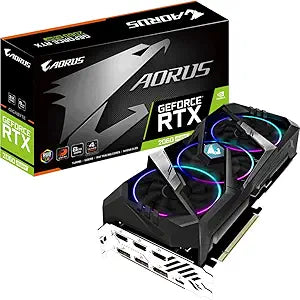
Gigabyte GV-N206SAORUS-8GC Aorus RTX 2060 Super 8GB
7680 x 4320
Unleash Peak Gaming Performance with Aorus CoolingThe Gigabyte Aorus GeForce RTX 2060 Super RGB graphics card delivers exceptional cooling for its core components, ensuring stable and high-performance gaming sessions. Specifications: Brand: Gigabyte Model: GV-N206SAORUS-8GC Graphics Card: GeForc...
Check availability
Affiliate Disclosure: As an Amazon Associate, Studio Supplies earns from qualifying purchases made through links on this page, at no additional cost to you. This helps support our editorial team.
Notice a mistake? Let Us Know
Overview
Unleash Peak Gaming Performance with Aorus Cooling
The Gigabyte Aorus GeForce RTX 2060 Super RGB graphics card delivers exceptional cooling for its core components, ensuring stable and high-performance gaming sessions.
Specifications:
- Brand: Gigabyte
- Model: GV-N206SAORUS-8GC
- Graphics Card: GeForce RTX 2060 Super
- Memory: 8 GB
- Cooling: 100 mm Triple Fan
- RGB: Yes
Key Features
8GB of memory
3x 100 mm fans
Display, USB, and HDMI ports
7680 x 4320 resolution
PCI Express 3.0 x16
Specifications
GPU Model
Aorus RTX 2060 Super
Memory
8GB
Cooling
3x 100 mm fans
Max Resolution
7680 x 4320
Interface
PCI Express 3.0 x16
Output Ports
Display, USB, HDMI
Frequently Asked Questions
How much video memory does the Gigabyte Aorus RTX 2060 Super have?
The Gigabyte Aorus RTX 2060 Super graphics card comes with 8GB of memory.
What is the maximum resolution supported by this graphics card?
This graphics card supports an impressive maximum resolution of 7680 x 4320, enabling high-fidelity visuals on compatible displays.
Does this graphics card have multiple fans for cooling?
Yes, the Gigabyte Aorus RTX 2060 Super is equipped with 3x 100 mm fans for effective cooling performance.
What types of display ports are available on this card?
This graphics card includes Display, USB, and HDMI ports for connecting to various monitors and devices.
What interface does this graphics card use to connect to the motherboard?
It connects to the motherboard via a PCI Express 3.0 x16 interface, ensuring high-bandwidth communication.
Related Products


