
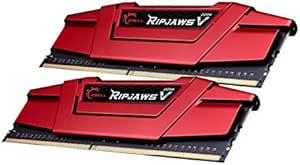
G.Skill FBA_F4-2666C15D-16GVR Ripjaws V 16GB DDR4 2666MHz RAM
Boost Your System's Performance with High-Speed MemoryThe G.Skill Ripjaws V Series DDR4 RAM provides a significant boost to your system's performance, enhancing speed and responsiveness for gaming, content creation, and everyday tasks. Designed for reliability and compatibility, this memory kit i...
*Price sourced from Amazon.com. Last updated:Oct 23, 2026.Price and availability are subject to change — details.
Notice a mistake? Let Us Know
Overview
Boost Your System's Performance with High-Speed Memory
The G.Skill Ripjaws V Series DDR4 RAM provides a significant boost to your system's performance, enhancing speed and responsiveness for gaming, content creation, and everyday tasks. Designed for reliability and compatibility, this memory kit is an excellent choice for upgrading your desktop PC.
Specifications:
- Capacity: 16GB (2 x 8GB)
- Type: 288-Pin SDRAM DDR4
- Speed: DDR4 2666 (PC4-21300)
- CAS Latency: CL15-15-15-35
- Voltage: 1.20V
- Channel: Dual Channel
- Module Height: 42mm
Key Features
* Requires overclocking/BIOS adjustments. Maximum speed and performance depends on system components, including motherboard and CPU.
G.SKILL RipjawsV Series DDR4 U-DIMM Memory Kit, Model: F4-2666C15D-16GVR
Non-ECC, DDR4 U-DIMM, 288-pin, for Desktop PC & Gaming
Includes JEDEC default profile, and Intel XMP memory overclock profile
Do not mix memory kits. Memory kits are sold in matched kits that are designed to run together as a set. Mixing memory kits will result in stability issues or system failure.
Refer to G.SKILL memory QVL or RAM Configurator tool on the G.SKILL website for more details on validated motherboard and hardware.
Usage in any manner inconsistent with manufacturer specifications, warnings, designs, or recommendations will result in lower speeds, system instability, or damage to the system or its components.
Memory kits will boot at JEDEC default SPD speed at default BIOS settings with compatible hardware.
For memory kits with XMP overclock profile, enable XMP/DOCP/A-XMP profile in BIOS to reach up to the rated potential XMP overclock speed of the memory kit, subject to the use of compatible hardware. Enabling XMP is an act of overclocking and requires BIOS setting adjustments.
Visit the G.SKILL warranty policy webpage for more details.
Specifications
Frequently Asked Questions
Related Products


