

HP
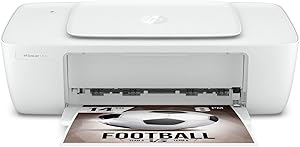
HP 1255 Deskjet Compact Color Inkjet Printer
1200 x 12004800 x 1200USB 2.0
Simplify Your Printing with the HP Deskjet 1255 Inkjet Printer The HP Deskjet 1255 is a compact and affordable inkjet printer designed for everyday printing needs. With its simple setup, dependable performance, and USB connectivity, this printer is perfect for home offices and students. Specific...
$115.00*
Check availability
*Price sourced from Amazon.com. Last updated:Aug 30, 2026.Price and availability are subject to change — details.
Affiliate Disclosure: As an Amazon Associate, Studio Supplies earns from qualifying purchases made through links on this page, at no additional cost to you. This helps support our editorial team.
Notice a mistake? Let Us Know
Overview
Simplify Your Printing with the HP Deskjet 1255 Inkjet Printer
The HP Deskjet 1255 is a compact and affordable inkjet printer designed for everyday printing needs. With its simple setup, dependable performance, and USB connectivity, this printer is perfect for home offices and students.
Specifications:
- Functions: Print Only
- Print Technology: Color Inkjet
- Print Resolution: Up to 4800 x 1200 optimized dpi color
- Print Speed: Black: Up to 7.5 ppm, Color: Up to 5.5 ppm
- Connectivity: 1 Hi-Speed USB 2.0
- Paper Handling: 60-sheet input tray, 25-sheet output tray
- Duty Cycle: Up to 1000 pages per month
- Paper Size Support: 8.5" x 14"
Key Features
Single-Function: Print only. Manual 2-sided Printing.
ISO Speed: Black: Up to 7.5 ppm; Color: Up to 5.5 ppm. Paper Handling: 60-sheet input tray; 25-sheet output tray.
Print Resolution: Black (best): Up to 1200 x 1200 rendered dpi; Color (best): Up to 4800 x 1200 optimized dpi color (when printing from a computer on selected HP photo papers and 1200 input dpi).
Wired Printer: No W-i-F-i. Standard Connectivity: 1 Hi-Speed USB 2.0.
Use HP Smart app for a simple setup, and you're ready to print in no time.
Specifications
Functionality
Print only
Duplex Printing
Manual 2-sided
Black ISO Speed
Up to 7.5 ppm
Color ISO Speed
Up to 5.5 ppm
Paper Input Tray Capacity
60 sheets
Paper Output Tray Capacity
25 sheets
Black Print Resolution (best)
Up to 1200 x 1200 rendered dpi
Color Print Resolution (best)
Up to 4800 x 1200 optimized dpi color (from computer on select HP photo papers with 1200 input dpi)
Connectivity
1 Hi-Speed USB 2.0
Wireless Capability
No W-i-F-i
Frequently Asked Questions
Does this printer support wireless printing from my devices?
No, the HP 1255 Deskjet Compact Color Inkjet Printer is a wired-only device, featuring 1 Hi-Speed USB 2.0 for connectivity without Wi-Fi.
Can this printer automatically print on both sides of the paper?
This printer supports manual 2-sided printing, meaning you will need to manually flip the pages to print on the second side.
What are the maximum print speeds for this model?
The printer offers ISO speeds of up to 7.5 pages per minute (ppm) for black documents and up to 5.5 ppm for color documents.
What is the paper capacity of the input tray?
The input tray of the HP 1255 Deskjet Compact Color Inkjet Printer has a capacity for 60 sheets of paper.
What is the highest resolution I can expect for color prints?
For color prints, you can achieve up to 4800 x 1200 optimized dpi when printing from a computer on selected HP photo papers and using a 1200 input dpi.
Is there an app available to help with printer setup?
Yes, the HP Smart app is available to provide a simple setup process for this printer, getting you ready to print quickly.
Related Products


