

HP
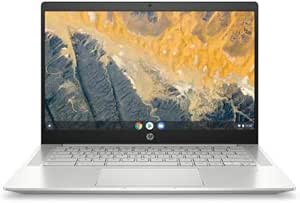
HP 1W2Q6UT#ABA Pro c640 14" Chromebook i5
Efficient and Secure Computing with Chrome OS The HP Pro c640 14" Chromebook offers a streamlined and secure computing experience with Chrome OS. Powered by an Intel Core i5 processor and ample RAM, this Chromebook delivers fast performance and long battery life for on-the-go productivity. Speci...
$197.99*
View on Amazon
✓ In Stock on Amazon.com
*Price sourced from Amazon.com. Last updated:Aug 27, 2026.Price and availability are subject to change — details.
Affiliate Disclosure: As an Amazon Associate, Studio Supplies earns from qualifying purchases made through links on this page, at no additional cost to you. This helps support our editorial team.
Notice a mistake? Let Us Know
Overview
Efficient and Secure Computing with Chrome OS
The HP Pro c640 14" Chromebook offers a streamlined and secure computing experience with Chrome OS. Powered by an Intel Core i5 processor and ample RAM, this Chromebook delivers fast performance and long battery life for on-the-go productivity.
Specifications:
- Processor: Intel Core i5-10310U Quad-core (4 Core) 1.70 GHz
- Memory: 8 GB RAM
- Storage: 64 GB Flash Memory
- Operating System: Chrome OS
- Graphics: Intel UHD Graphics
- Keyboard: English Keyboard
- Battery: 12 Hour Battery Run Time
- Display: 14" TFT
Key Features
HP Pro c640 14" Chromebook - Intel Core i5 (10th Gen) i5-10310U Quad-core (4 Core) 1.70 GHz - 8 GB RAM - 64 GB Flash Memory - Chrome OS - Intel UHD Graphics - English Keyboard - 12 Hour Battery Run T
Specifications
Display Size
14 inches
Processor
Intel Core i5 (10th Gen) i5-10310U Quad-core
Processor Speed
1.70 GHz
RAM
8 GB
Storage Type
Flash Memory
Storage Capacity
64 GB
Operating System
Chrome OS
Graphics
Intel UHD Graphics
Keyboard Language
English
Battery Run Time
12 Hour
Frequently Asked Questions
What operating system does this HP Pro c640 Chromebook use?
The HP Pro c640 14" Chromebook operates on Chrome OS, providing a streamlined and web-centric computing experience.
What processor is included in the HP Pro c640 Chromebook?
This Chromebook features an Intel Core i5 (10th Gen) i5-10310U Quad-core processor, capable of reaching 1.70 GHz.
How much RAM is available in this Chromebook?
The HP Pro c640 Chromebook comes equipped with 8 GB of RAM, designed to support multitasking within the Chrome OS environment.
What is the storage capacity of this device?
Storage on this model is handled by a 64 GB Flash Memory, which is suitable for cloud-based workflows and essential local files.
What is the expected battery life of the HP Pro c640 Chromebook?
This Chromebook offers a battery run time of up to 12 hours, providing extended productivity throughout the day.
Does this Chromebook come with an integrated graphics solution?
Yes, the HP Pro c640 Chromebook includes Intel UHD Graphics, which is integrated for visual processing tasks.
Related Products


