

HP
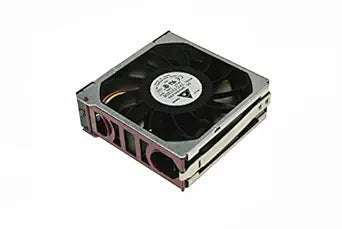
HP 233101-002 120MM HOT-Plug Fan
HP's 120mm hot-plug replacement fan keeps your ProLiant ML570 G3 server running at safe operating temperatures.
View price on Amazon
Affiliate Disclosure: As an Amazon Associate, Studio Supplies earns from qualifying purchases made through links on this page, at no additional cost to you. This helps support our editorial team.
Notice a mistake? Let Us Know
Overview
Keep Your System Cool and Running Smoothly
The HP Fan is designed to provide efficient cooling for your system. This hot-plug fan is for easy installation and replacement, ensuring optimal thermal performance for your critical components.
Key Features:
- Type: Hot-Plug Fan.
- Size: 120MM.
Specifications:
- Brand: HP
- Model: 233101-002
- Type: Fan
- Size: 120MM
- Compatibility: HP ML570 G3
Frequently Asked Questions
Which HP server models is this 233101-002 fan compatible with?
This fan is designed for the HP ProLiant ML570 G3 server. Verify your server's part number compatibility before ordering, as other ML-series servers use different fan assemblies.
What does "hot-plug" mean for this fan?
Hot-plug means you can remove and install this fan while the server is powered on and running, minimizing downtime during replacement. The server chassis has a hot-plug fan bay that supports live swapping.
Is this an OEM HP part or a third-party replacement?
This is listed under HP's part number 233101-002, identifying it as an OEM HP component designed for use in HP ProLiant servers.
How do I know if this fan needs to be replaced in my server?
Your server's Integrated Lights-Out (iLO) management interface or system health LEDs will report fan failures or degraded speeds. Increased chassis noise or thermal warnings in system logs are also indicators of a failing fan.
Related Products


