



HP
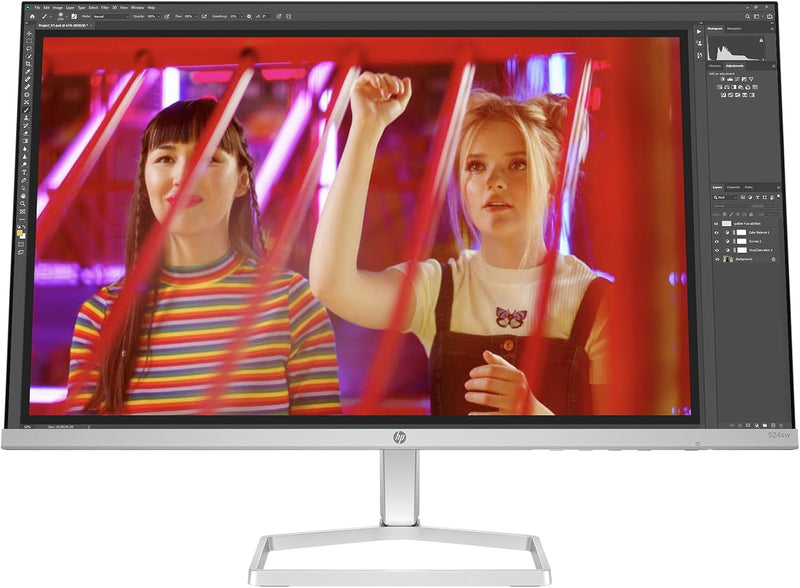
HP 2D9K1AA#ABA Series 5 24-Inch FHD IPS Monitor
★★★★★
FHD1920 x 1080
Immerse Yourself: HP Series 5 24-inch FHD Monitor Experience vibrant visuals and comfortable viewing with the HP Series 5 monitor. Featuring a Full HD display, IPS panel, and HP Eye Ease technology, it delivers exceptional image quality and reduces eye strain. Specifications: Screen Size: 23...
View price on Amazon
Affiliate Disclosure: Studio Supplies may earn a commission from qualifying purchases made through links on this page, at no additional cost to you. This helps support our editorial team.
Notice a mistake? Let Us Know
Overview
Immerse Yourself: HP Series 5 24-inch FHD Monitor
Experience vibrant visuals and comfortable viewing with the HP Series 5 monitor. Featuring a Full HD display, IPS panel, and HP Eye Ease technology, it delivers exceptional image quality and reduces eye strain.
Specifications:
- Screen Size: 23.8 inches
- Resolution: Full HD (1920 x 1080)
- Panel Type: IPS
- Color Gamut: 99% sRGB
- Contrast Ratio: 1500:1
- Brightness: 300 nits
- Refresh Rate: 100 Hz
- Features: HP Eye Ease with Eyesafe Certification, Adjustable Tilt
- Aspect Ratio: 16:9
Key Features
COMPACT, SLEEK DESIGN - A beautiful monitor fit for any space with a sleek, thin-and-light profile and the option for seamless side-by-side screens. Integrated cable containment to cut the clutter.
FHD RESOLUTION - Focus on the finer details and enjoy sharp visuals and crystal clear images with the 1920 x 1080 FHD resolution on this 23.8" diagonal monitor"
IPS PANEL - No matter where you stand, IPS technology ensures image accuracy and consistency across wide 178-degrees horizontal and vertical viewing angles
99% SRGB COLOR GAMUT- Ideal, consistent color reproduction with minimal effort
MORE CONTRAST - See the nuanced differences of color, shadow, and highlights thanks to the enhanced 1500:1 contrast ratio
300 NITS - 300 nits of brightness lets you see clearly. Enhance your visual performance for work or simply enjoying entertainment
100 HZ REFRESH RATE - With a 100 Hz refresh rate this monitor is capable of clearer details, smoothly moving from frame to frame, allowing for faster split-second reaction time
HP EYE EASE WITH EYESAFE CERTIFICATION - Help keep your eyes comfortable with an always-on, true-color, low-blue light filter
ADJUSTABLE TILT - The tilt-adjustable stand helps deliver the perfect view so you can maximize productivity and work comfortably
HP DISPLAY CENTER - Customize your display with easy, intuitive HP Display Center software
Specifications
Model
HP Series 5 24-Inch FHD IPS Monitor
Display Size
23.8 inches diagonal
Resolution
FHD (1920 x 1080)
Panel Type
IPS
Viewing Angles
178 degrees horizontal and vertical
Color Gamut
99% sRGB
Contrast Ratio
1500:1
Brightness
300 nits
Refresh Rate
100 Hz
Eye Comfort
HP Eye Ease with Eyesafe Certification (low-blue light filter)
Stand Adjustability
Tilt-adjustable
Design
Sleek, thin-and-light profile, integrated cable containment
Software
HP Display Center
Pros & Cons
👍 Pros
- Delivers sharp visuals and crystal-clear images with its 1920 x 1080 FHD resolution on a 23.8-inch diagonal screen.
- Utilizes an IPS panel, ensuring consistent image accuracy and wide 178-degree horizontal and vertical viewing angles.
- Offers ideal and consistent color reproduction with a 99% sRGB color gamut, suitable for creative tasks.
- Enhances visual performance with a high 1500:1 contrast ratio, revealing nuanced differences in colors and shadows.
- Provides 300 nits of brightness, allowing for clear visibility in various lighting conditions for work or entertainment.
- Features a 100 Hz refresh rate, capable of clearer details and smoother motion for a more responsive experience.
- Includes HP Eye Ease with Eyesafe Certification, an always-on low-blue light filter that helps maintain eye comfort without color distortion.
- Designed with an adjustable tilt stand, allowing users to find the perfect viewing angle for maximum productivity and comfort.
- Features a compact, sleek design with integrated cable containment, helping to reduce clutter for a clean workspace.
- Customization options are available through the easy-to-use and intuitive HP Display Center software.
👎 Cons
- The 100 Hz refresh rate, while good, may not be sufficient for competitive gaming that often benefits from higher rates like 144Hz or 240Hz.
- The FHD resolution (1920x1080) on a 23.8-inch screen may not offer the pixel density desired by users accustomed to QHD or 4K monitors.
- While it has integrated cable containment, it does not specify what cables are included or how extensive the management system is.
- The monitor's description does not mention VESA mount compatibility, which is a common requirement for multi-monitor setups or ergonomic arms.
- Specifics on the input ports (e.g., HDMI, DisplayPort versions) are not provided, which could impact connectivity options.
Frequently Asked Questions
What is the resolution of the HP Series 5 24-inch monitor?
This monitor features an FHD resolution of 1920 x 1080, providing sharp visuals and clear images on its 23.8-inch diagonal display.
Does this monitor offer wide viewing angles?
Yes, it uses an IPS panel, which ensures image accuracy and consistency across wide 178-degree horizontal and vertical viewing angles.
Is the HP Series 5 monitor beneficial for color-sensitive work?
With a 99% sRGB color gamut, this monitor provides ideal and consistent color reproduction, making it suitable for tasks requiring accurate colors.
What is the refresh rate of this monitor?
The HP Series 5 monitor has a 100 Hz refresh rate, which allows for clearer details and smoother motion from frame to frame.
Does this monitor have features to reduce eye strain?
Yes, it includes HP Eye Ease with Eyesafe Certification, which is an always-on, true-color, low-blue light filter designed to help keep your eyes comfortable.
Can the monitor's stand be adjusted?
The stand for this monitor is tilt-adjustable, allowing you to find the perfect view for productivity and comfort.
How can I customize the display settings?
You can customize your display settings using the easy and intuitive HP Display Center software.
Related Products


