



HP
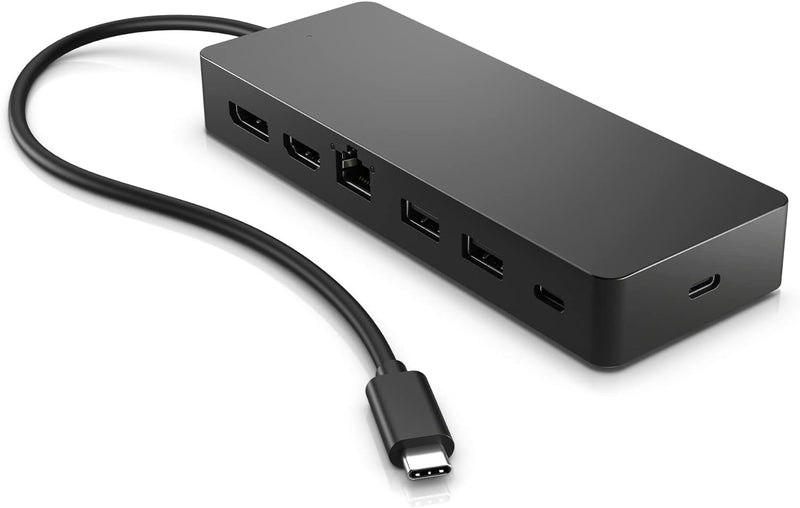
HP 50H98AA USB-C 7-in-1 Multiport Docking Station
4KUSB-CHDMI 2.0DisplayPort
Seven ports, dual 4K output, and cross-OS compatibility make this compact USB-C hub the single cable that replaces your entire desk's wiring tangle.
View price on Amazon
Affiliate Disclosure: As an Amazon Associate, Studio Supplies earns from qualifying purchases made through links on this page, at no additional cost to you. This helps support our editorial team.
Notice a mistake? Let Us Know
Overview
Key Features
Universal USB-C. Every OS. One simple, single USB-C cable plugs into your PC, regardless of the brand or OS so you can use your hub seamlessly. This hub now supports Windows, macOS and ChromeOS.
All kinds of ports: 7 multifunction ports provide a complete solution for just about any data, video, or network connection. 1 HDMI 2.0, 1 DisplayPort 1.2, 2 USB-A ports, 1 USB-C port, 1 USB-C passthrough port, and 1 ethernet port
Powers dual 4K displays: This small but mighty hub supports HDMI 2.0 and DisplayPort 1.2 connections for a higher quality resolution at 4K
Connect & power your PC: Keep your PC charged via the USB-C passthrough while powering up or connecting data through the 7 total ports.
Designed to travel: Slim and sleek design makes it easy to take on the go. Just pack alongside your PC and know that you can connect it all.
Specifications
Connectivity
Universal USB-C
Operating System Support
Windows, macOS, ChromeOS
HDMI Output
1 x HDMI 2.0
DisplayPort Output
1 x DisplayPort 1.2
USB-A Ports
2
USB-C Port
1
USB-C Passthrough Port
1 (for charging PC)
Ethernet Port
1
Display Resolution Support
Dual 4K
Frequently Asked Questions
Can this hub drive two 4K monitors simultaneously, and at what refresh rates?
Yes, with a caveat on resolution. The hub supports dual 4K output, but at 30Hz per display when both are active. If you run a single display, it supports up to 4K@60Hz via either the HDMI 2.0 or DisplayPort 1.2 port. This is a bandwidth constraint of the single USB-C connection to the host, not a defect.
How much power does the USB-C passthrough port deliver to the connected laptop?
The product does not publish a specific wattage for the passthrough port. It is designed to keep your laptop charged while the hub is in use, but users with high-wattage laptops (95W+) should verify that passthrough delivery meets their needs before relying on it as a primary charging source.
Does the RJ45 Ethernet port support Gigabit speeds?
The port is listed as an Ethernet port in the spec sheet but HP does not specify the maximum throughput in the product documentation. Based on the hub's USB-C bandwidth budget shared across all ports, real-world throughput will vary depending on concurrent port activity.
Is a driver installation required to use this hub on macOS or ChromeOS?
No. The hub is designed for driver-free plug-and-play operation on Windows 10/11, macOS, and ChromeOS via the USB-C connection — no software installation required.
Can the USB-C data port and USB-C passthrough port be used simultaneously?
Yes. They are separate ports with separate functions — the passthrough handles power delivery to the host machine while the data USB-C port handles peripheral connections independently.
Related Products


