



HP
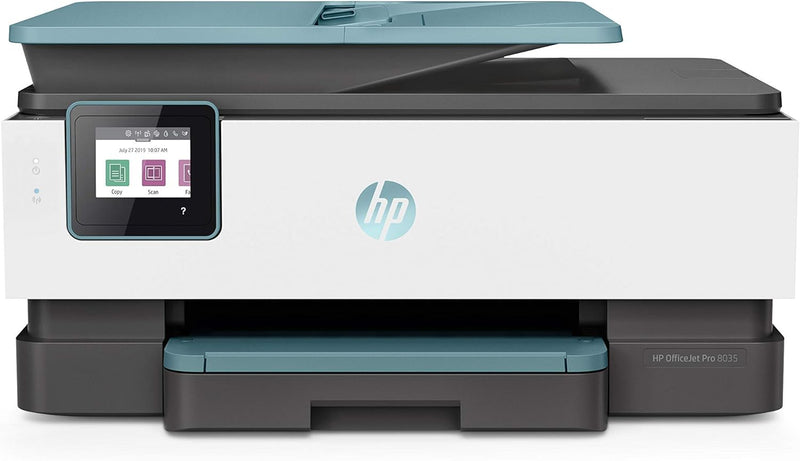
HP 8035 OfficeJet Pro Wireless All-in-One Printer
Enhance Productivity with a Smart and Sustainable PrinterIntroducing the HP OfficeJet Pro 8035 All-in-One Wireless Printer, a renewed device designed for home office productivity. This printer has been professionally inspected and tested to ensure it works and looks like new. Enjoy smart tasks, w...
$176.99*
View on Amazon
✓ In Stock on Amazon.com
*Price sourced from Amazon.com. Last updated:Aug 30, 2026.Price and availability are subject to change — details.
Affiliate Disclosure: As an Amazon Associate, Studio Supplies earns from qualifying purchases made through links on this page, at no additional cost to you. This helps support our editorial team.
Notice a mistake? Let Us Know
Overview
Enhance Productivity with a Smart and Sustainable Printer
Introducing the HP OfficeJet Pro 8035 All-in-One Wireless Printer, a renewed device designed for home office productivity. This printer has been professionally inspected and tested to ensure it works and looks like new. Enjoy smart tasks, wireless connectivity, and sustainable design features.
Specifications:
- Print Speed: 20 pages per minute
- Features: Fax, Scan-to-USB, Smart Tasks
- Connectivity: Wi-Fi, Ethernet
- Mobile Printing: HP Smart App
- Wi-Fi: Self-Healing Wi-Fi
- Security: Built-in security essentials
- Material: Made from recycled plastics (up to 15%)
- Print Media: Paper (plain)
- Compatible Devices: Smartphones, PC, Laptops
- Sheet Size: 3.5 x 5; 4 x 6; 5 x 7; 8 x 10; 8.5 x 14
- Duplex: Automatic
- Hardware Interface: USB
- Control Method: App
- Memory Storage Capacity: 256 MB
- Color: Oasis
- Printer Output: Color
- Maximum Print Speed (Color): 10 ppm
- Max Printspeed Monochrome: 20 ppm
- Dimensions: 18.11 x 13.43 x 9.21 inches
- Weight: 20.5 pounds
Key Features
UPGRADE YOUR OFFICE – Replacing the HP OfficeJet Pro 6978, this home office printer offers faster printing at 20 pages per minute, includes fax and scan-to-USB capabilities, and is 14% smaller
SUSTAINABLE DESIGN – This inkjet printer is made from recycled plastics and other electronics—up to 15% by weight of plastic
ORGANIZE DOCUMENTS 50% FASTER – Eliminate steps in repetitive tasks and sync to Quickbooks, Google Drive, and more using Smart Tasks—the easiest way to digitize and organize receipts and business documents on your phone
PRINT REMOTELY USING HP SMART APP – Access your printer and scanner, monitor ink levels, and print, copy, and scan on the go with our highly-rated HP Smart app
SELF-HEALING WI-FI – Ensures you stay connected by detecting issues and automatically undergoing up to 3 stages of reconnection to keep your Wi-Fi stable and reliable
BUILT-IN SECURITY ESSENTIALS – Protect sensitive data with built-in security essentials like basic encryption, password protection, Wi-Fi security, and document protection
SUSTAINABLE DESIGN – This inkjet printer is made from recycled plastics and other electronics—up to 15% by weight of plastic
Specifications
Brand
HP
Model Name
OfficeJet Pro 8035
Printer Type
Wireless All-in-One Inkjet Printer
Printing Speed
20 pages per minute
Fax Capability
Yes
Scan-to-USB
Yes
Size Reduction
14% smaller (than HP OfficeJet Pro 6978)
Sustainable Design
Made from recycled plastics (up to 15% by weight of plastic)
Document Organization
Smart Tasks (syncs to Quickbooks, Google Drive)
Remote Printing
HP Smart app
Wireless Connectivity
Self-Healing Wi-Fi
Security Features
Basic encryption, password protection, Wi-Fi security, document protection
Frequently Asked Questions
How fast does the HP OfficeJet Pro 8035 print?
The HP OfficeJet Pro 8035 offers a printing speed of 20 pages per minute, making it a faster option compared to the HP OfficeJet Pro 6978.
Can I scan documents directly to a USB drive with this printer?
Yes, this all-in-one printer includes scan-to-USB capabilities, providing a convenient way to digitize and save your documents.
What security features are included with this printer?
The HP OfficeJet Pro 8035 comes with built-in security essentials, including basic encryption, password protection, Wi-Fi security, and document protection to safeguard sensitive data.
How does the Self-Healing Wi-Fi function on this device?
The Self-Healing Wi-Fi feature ensures a stable connection by automatically detecting issues and initiating up to 3 stages of reconnection to maintain reliability.
Is this printer designed with sustainability in mind?
Yes, the HP OfficeJet Pro 8035 is designed with sustainability, made from recycled plastics and other electronics, with up to 15% by weight of plastic being recycled material.
Can I manage and print documents using my phone?
Yes, you can access your printer and scanner, monitor ink levels, and print, copy, and scan remotely using the highly-rated HP Smart app.
How can Smart Tasks help with document organization?
Smart Tasks help eliminate steps in repetitive tasks and allow you to sync with applications like Quickbooks and Google Drive, making it easier to digitize and organize receipts and business documents 50% faster using your phone.
Related Products


