

HP
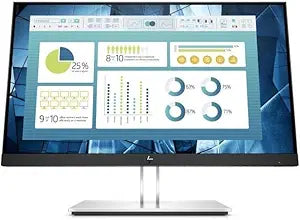
HP 9VG12AA#ABA E24q G4 23.8" QHD Monitor
QHD
Experience Crisp Visuals with Enhanced Comfort The HP E24q G4 QHD Monitor delivers stunning visuals and comfortable viewing. Featuring a 23.8-inch IPS panel with QHD resolution, this monitor offers exceptional clarity and wide viewing angles. HP EyeEase technology reduces blue light emissions, w...
$398.00*
View on Amazon
✓ In Stock on Amazon.com
*Price sourced from Amazon.com. Last updated:Aug 31, 2026.Price and availability are subject to change — details.
Affiliate Disclosure: As an Amazon Associate, Studio Supplies earns from qualifying purchases made through links on this page, at no additional cost to you. This helps support our editorial team.
Notice a mistake? Let Us Know
Overview
Experience Crisp Visuals with Enhanced Comfort
The HP E24q G4 QHD Monitor delivers stunning visuals and comfortable viewing. Featuring a 23.8-inch IPS panel with QHD resolution, this monitor offers exceptional clarity and wide viewing angles. HP EyeEase technology reduces blue light emissions, while the adjustable stand ensures ergonomic comfort. Connect easily with DisplayPort, HDMI, and VGA.
- Screen Size: 23.8"
- Panel Type: IPS
- Resolution: 2560 x 1440 QHD
- Aspect Ratio: 16:9 Widescreen
- Bezel: 3-sided micro-edge
- Low Blue Light: HP EyeEase-Low Blue Light Hardware
- Adjustability: Height, Swivel, Pivot, & Tilt adjustable
- Connectivity: DP, HDMI, and VGA
Key Features
Number of Screens: 1
Viewable Screen Size: 23.8"
Screen Mode: 3-sided micro-edge
Display Screen Type: Quad HD
Panel Technology: In-plane Switching (IPS) Technology
Specifications
Brand
HP
Model
E24q G4
Number of Screens
1
Viewable Screen Size
23.8"
Screen Mode
3-sided micro-edge
Display Screen Type
Quad HD
Panel Technology
In-plane Switching (IPS) Technology
Frequently Asked Questions
What is the screen size of the HP E24q G4 monitor?
The HP E24q G4 monitor features a 23.8-inch viewable screen size, providing ample space for various tasks.
What kind of display quality does this monitor offer?
This monitor offers a Quad HD display screen type with In-plane Switching (IPS) Technology, which generally provides clear images and wide viewing angles.
Does the HP E24q G4 monitor have thin bezels?
Yes, the HP E24q G4 monitor features a 3-sided micro-edge screen design, which results in very thin bezels for an expansive viewing experience.
What panel technology is used in this HP monitor?
The HP E24q G4 monitor uses In-plane Switching (IPS) Technology, known for its consistent color and wide viewing angles.
Is this monitor suitable for multi-monitor setups?
With its 3-sided micro-edge design, the HP E24q G4 monitor could be a good option for multi-monitor setups as the minimal bezels reduce gaps between screens.
Related Products


