

HP
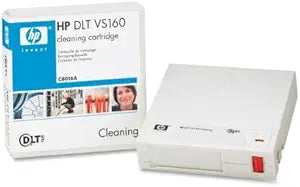
HP C8016A DLT VS160 Cleaning Cartridge New
Ensure Peak Performance for Your Tape DrivesThe HP C8016A DLT VS160 Cleaning Cartridge keeps your data storage systems running smoothly. Compatible with DLT VS1, DLT VS160, and DLT-IV tape drives, this new cartridge ensures optimal performance and reliability by removing contaminants.
Check availability
Affiliate Disclosure: As an Amazon Associate, Studio Supplies earns from qualifying purchases made through links on this page, at no additional cost to you. This helps support our editorial team.
Notice a mistake? Let Us Know
Overview
Ensure Peak Performance for Your Tape Drives
The HP C8016A DLT VS160 Cleaning Cartridge keeps your data storage systems running smoothly. Compatible with DLT VS1, DLT VS160, and DLT-IV tape drives, this new cartridge ensures optimal performance and reliability by removing contaminants.
Specifications
Brand
HP
Model
C8016A
Type
DLT VS160 Cleaning Cartridge
Condition
New
Frequently Asked Questions
What is the purpose of the HP C8016A DLT VS160 Cleaning Cartridge?
The HP C8016A DLT VS160 Cleaning Cartridge is used to clean the read/write heads and tape path of DLT VS160 tape drives, which helps maintain optimal performance and prevent data errors.
How often should I use this cleaning cartridge?
The frequency of use typically depends on the tape drive manufacturer's recommendations and the volume of tape usage, but generally, it's used after a certain number of hours or read/write operations.
Is this cleaning cartridge compatible with other types of DLT drives?
No, the HP C8016A is specifically designed for DLT VS160 tape drives and is not compatible with other DLT formats or different types of tape drives.
How many uses does a single HP C8016A cleaning cartridge provide?
Cleaning cartridges typically have a limited number of uses, which is often indicated on the cartridge or in the drive's documentation, after which they need to be replaced.
Can improper use of the cleaning cartridge damage my DLT VS160 drive?
Using the correct cleaning cartridge and following the drive's instructions is crucial; improper or excessive cleaning could potentially cause wear on the drive heads.
Related Products


