



HP
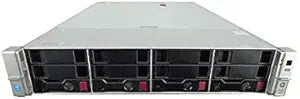
HP DL380G9-P440-2660V4-16GB-16TB-0R-0B Server: 2X Xeon E5-2660 V4, 16GB, 16TB (Renewed)
16GB DDR4
Dual 14-core Broadwell-EP muscle and 16TB of SAS storage make the DL380 G9 a proven virtualization and database workhorse.
View price on Amazon
Affiliate Disclosure: As an Amazon Associate, Studio Supplies earns from qualifying purchases made through links on this page, at no additional cost to you. This helps support our editorial team.
Notice a mistake? Let Us Know
Overview
Power Your Enterprise with the HP DL380 G9 Server
The HP DL380 G9 is a workhorse server, engineered to deliver exceptional performance and reliability for demanding business applications. Equipped with dual Intel Xeon E5-2660 V4 processors, ample DDR4 memory, and high-capacity SAS storage, it's ready to tackle virtualization, database management, and more.
Specifications:
- System: HP DL380 G9 4-Bay 3.5" Server
- Processors: 2x Intel Xeon E5-2660 V4 (14-Core, 2.0Ghz)
- Memory: 16GB DDR4 REG RAM
- Hard Drives: 16TB (4x 4TB SAS 12Gb/s 3.5")
- Controller: HPE Smart Array P440 12Gb/s
- Power Supplies: Dual PSU
Key Features
HP DL380 G9 4-Bay 3.5 Server
2x Intel Xeon E5-2660 V4 14-Core 2.0Ghz
16GB DDR4 REG RAM
HPE Smart Array P440 12Gb/s
16TB (4x 4TB SAS 12Gb/s 3.5")
Frequently Asked Questions
What is the maximum RAM this DL380 G9 configuration supports beyond the included 16GB?
The DL380 G9 supports up to 3TB of DDR4 LRDIMM across 24 DIMM slots. The included 16GB is a starting point — the platform is designed to scale, so adding registered ECC DDR4 DIMMs is straightforward as workloads grow.
Does the P440 controller support RAID, and which levels are available?
Yes. The HPE Smart Array P440 supports RAID 0, 1, 5, 6, 10, 50, and 60 with its onboard cache. For data integrity under write-heavy loads, pairing the P440 with a Flash-Backed Write Cache (FBWC) module is strongly recommended — though verify whether one is included in this specific listing.
Are the dual E5-2660 V4 processors sufficient for running VMware ESXi or Hyper-V?
Yes — each E5-2660 V4 is a 14-core, 28-thread chip running at 2.0GHz base with a 35MB L3 cache. Combined, you have 28 physical cores and 56 logical threads available to a hypervisor, which is a solid foundation for medium-density VM farms.
What does "Renewed" mean for this server, and what should I verify on arrival?
Renewed indicates the unit has been refurbished and tested. On arrival, verify iLO firmware version, check the P440 cache battery/FBWC health via HPE Smart Storage Administrator, confirm all four SAS drives are detected and healthy, and run an HPE memory diagnostic to validate all DIMMs.
Can the 4x 4TB SAS drives be reconfigured into a different RAID level?
Yes. With four drives, you can run RAID 5 (net ~12TB usable, one drive fault tolerance), RAID 10 (net ~8TB, better random I/O), or RAID 6 (net ~8TB, two-drive fault tolerance). Configuration is done via the P440 BIOS utility or HPE SSA from within the OS.
Related Products


