

HP
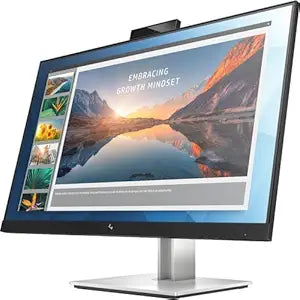
HP E24d G4 23.8" FHD IPS Docking Monitor
FHD
The Ultimate Productivity Hub: HP E24d G4 FHD Advanced Docking Monitor Transform your workspace with the HP E24d G4 23.8" Full HD LCD Advanced Docking Monitor. This monitor simplifies connectivity and provides a central hub for all your devices, allowing you to connect your PC with a single USB-C...
$174.99*$349.00Save 49%
Check availability
*Price sourced from Amazon.com. Last updated:Sep 04, 2026.Price and availability are subject to change — details.
Affiliate Disclosure: As an Amazon Associate, Studio Supplies earns from qualifying purchases made through links on this page, at no additional cost to you. This helps support our editorial team.
Notice a mistake? Let Us Know
Overview
The Ultimate Productivity Hub: HP E24d G4 FHD Advanced Docking Monitor
Transform your workspace with the HP E24d G4 23.8" Full HD LCD Advanced Docking Monitor. This monitor simplifies connectivity and provides a central hub for all your devices, allowing you to connect your PC with a single USB-C cable. With advanced network manageability features, it's the perfect solution for modern business environments.
Specifications:
- Screen Size: 23.8 inches
- Viewable Screen Size: 23.8 inches
- Resolution: 1920 x 1080 (Full HD)
- Panel Technology: In-Plane Switching (IPS) Technology
- Aspect Ratio: 16:9
- Response Time: 5 ms GTG
- Refresh Rate: 60 Hz
- Contrast Ratio: 1,000:1
- Mount Type: Desk Mountable, Wall Mountable
- Backlight: LED
- Adjustments: Pivot, Height, Swivel, Tilt
- Horizontal Viewing Angle: 178°
- Vertical Viewing Angle: 178°
Key Features
Number of Screens: 1
Screen Size Class: 24"
Viewable Screen Size: 23.8"
Screen Mode: Full HD
Panel Technology: In-plane Switching (IPS) Technology
Horizontal viewing angle : 178° horizontal
Specifications
Product Type
Docking Monitor
Brand
HP
Model
E24d G4
Screen Size Class
24 inches
Viewable Screen Size
23.8 inches
Screen Mode
Full HD
Panel Technology
In-plane Switching (IPS) Technology
Horizontal Viewing Angle
178°
Frequently Asked Questions
What is the screen size of the HP E24d G4 monitor?
The HP E24d G4 monitor has a viewable screen size of 23.8 inches, falling into the 24-inch class.
What resolution does this monitor support?
This monitor operates in Full HD screen mode, providing clear visuals for various applications.
What type of panel technology is used in the HP E24d G4?
The HP E24d G4 monitor features In-plane Switching (IPS) Technology for its panel.
What are the viewing angles for this monitor?
It offers a wide 178° horizontal viewing angle, ensuring consistent image quality from various positions.
Is this monitor designed for productivity or gaming?
As a "Docking Monitor" with Full HD and IPS technology, it is primarily designed for productivity and general use, rather than high-refresh-rate gaming.
Does this monitor include features for connecting peripherals?
It is described as a "Docking Monitor," suggesting it integrates features for connecting multiple peripherals directly to the display.
Related Products

