



HP
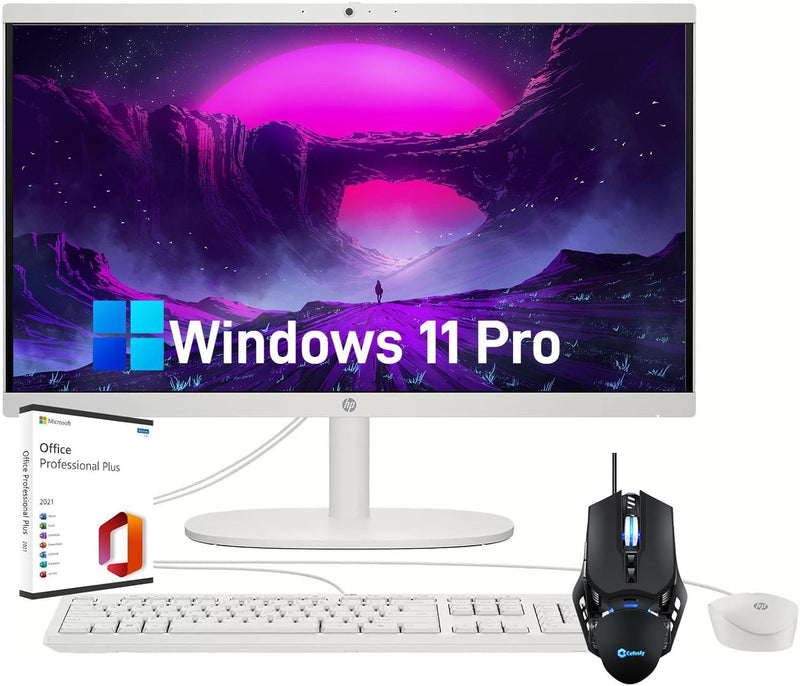
HP HP All-in-One Desktop PC 1TB SSD 16GB RAM Intel Celeron J4025
FHD16GB RAM1TB SSD
A cable-free all-in-one with Wi-Fi 6, a 1TB SSD, and a lifetime Office license included out of the box.
View price on Amazon
Affiliate Disclosure: As an Amazon Associate, Studio Supplies earns from qualifying purchases made through links on this page, at no additional cost to you. This helps support our editorial team.
Notice a mistake? Let Us Know
Overview
Key Features
Powerful Performance: The HP All-in-One Desktop is powered by the Intel Celeron J4025 processor, featuring 2 cores, 2 threads, and speeds up to 2.9 GHz. With 8 GB of RAM, this desktop delivers smooth multitasking, whether you're browsing the web, streaming videos, or tackling light productivity tasks
Clear 21.5" FHD Display: Immerse yourself in vibrant visuals on the 21.5-inch FHD IPS display. With sharp details and rich colors, this display enhances your viewing experience, making it ideal for both work and entertainment
Ample Storage: Equipped with SSD storage, this all-in-one desktop offers lightning-fast boot times and speedy file transfers. Enjoy ample space to store your files, documents, photos, and videos without worrying about storage limitations
Seamless Connectivity: Stay connected with Wi-Fi 6, providing faster and more reliable wireless connections for smooth browsing, streaming, and online gaming. The built-in Bluetooth allows you to connect wireless peripherals effortlessly
Windows 11 Pro: Enjoy the advanced productivity and security features of Windows 11 Pro
Specifications
Operating System
Windows 11 Pro
Processor
Intel Celeron J4025, 2-core, up to 2.9 GHz
Graphics
Intel UHD Graphics (integrated)
Display
21.5-inch FHD IPS LED, 1920 x 1080
Memory
16GB DDR4 RAM
Storage
1TB SSD
Wireless
Wi-Fi 6, Bluetooth
Ports
2x USB-A 2.0, 2x USB-A 3.0, 1x HDMI, 1x Combo Audio Jack, 1x SD Card Reader 3.0
Included Accessories
Webcam, Black Mouse, Microsoft Office Lifetime License
Color
White
Dimensions
19.43" W x 15.07" H x 6.69" D
Weight
9.19 pounds
Frequently Asked Questions
Is the Intel Celeron J4025 adequate for everyday productivity work?
For web browsing, email, video streaming, and Office applications, yes — but with caveats. The J4025 is a dual-core Gemini Lake processor with a 10W TDP, which means it runs cool and quiet but lacks the headroom for demanding multitasking, video encoding, or running more than a handful of browser tabs alongside other applications simultaneously.
Can the RAM or storage be upgraded after purchase?
This is an all-in-one desktop, and HP's consumer AIO designs at this tier typically solder or tightly integrate components. Check the specific service manual before assuming upgradability — if the RAM is upgradeable, the 16GB DDR4 already installed is a reasonable ceiling for this processor tier.
What does Wi-Fi 6 actually improve over Wi-Fi 5 for this machine?
On a machine used primarily for web browsing and streaming, the practical difference is reduced congestion in environments with many connected devices. Wi-Fi 6's OFDMA and MU-MIMO improvements help when multiple devices compete for the same router — in a home office with several simultaneous users or devices, the connection stays more consistent.
Does the 1TB SSD deliver meaningful real-world speed over a traditional HDD?
Dramatically. Boot times drop to under 20 seconds from cold, application launches feel near-instant, and file transfers are substantially faster. For the Celeron J4025's performance tier, the SSD is arguably the single biggest contributor to perceived responsiveness.
What ports are available for connecting peripherals?
The unit includes 2x USB-A 2.0, 2x USB-A 3.0, 1x HDMI output, 1x combo headphone/microphone jack, and 1x SD card reader 3.0. There is no USB-C port, which is worth noting if your peripherals require it.
Related Products

