

HP
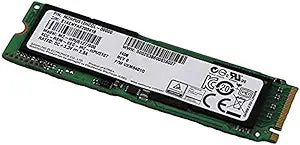
HP L3M57AA 256GB M.2 Internal Solid State Drive
Speed and Efficiency: HP 256 GB M.2 Solid State DriveUpgrade your system with the HP 256 GB M.2 Solid State Drive and experience significantly improved performance. This internal SSD enhances boot-up, shut down, and application loading times, providing a faster and more responsive computing exper...
View price on Amazon
Affiliate Disclosure: As an Amazon Associate, Studio Supplies earns from qualifying purchases made through links on this page, at no additional cost to you. This helps support our editorial team.
Notice a mistake? Let Us Know
Overview
Speed and Efficiency: HP 256 GB M.2 Solid State Drive
Upgrade your system with the HP 256 GB M.2 Solid State Drive and experience significantly improved performance. This internal SSD enhances boot-up, shut down, and application loading times, providing a faster and more responsive computing experience.
- Capacity: 256 GB
- Form Factor: M.2
- Type: Solid State Drive
- Internal/External: Internal
Key Features
Capacity: 256 GB
Form Factor: M.2
Product type: Solid state drive - internal
Specifications
Brand
HP
Capacity
256 GB
Form Factor
M.2
Product Type
Solid state drive - internal
Frequently Asked Questions
What is the capacity of this HP M.2 Solid State Drive?
This HP L3M57AA M.2 Internal Solid State Drive has a capacity of 256 GB.
What form factor is this SSD?
This is an M.2 form factor solid state drive, designed for compact installation in compatible systems.
Is this an internal or external storage device?
The HP L3M57AA is an internal solid state drive, meant to be installed inside a computer.
Will this SSD improve my computer's speed?
As a solid state drive, it generally offers significantly faster boot times and application loading compared to traditional hard drives, which can improve overall system responsiveness.
What kind of computers are compatible with an M.2 SSD?
An M.2 SSD like the HP L3M57AA requires a motherboard with a compatible M.2 slot, commonly found in newer laptops and desktop PCs.
Related Products


