

HP
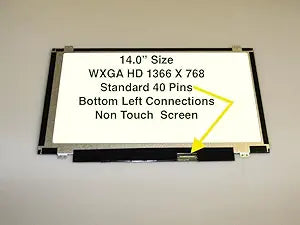
HP LED-1366-768-G-40-14.0-SLIM-U-EE8567 Pavilion DM4-3050US Screen
Restore your HP Pavilion DM4-3050US with this 14-inch slim LED replacement screen featuring 1366x768 resolution.
View price on Amazon
Affiliate Disclosure: As an Amazon Associate, Studio Supplies earns from qualifying purchases made through links on this page, at no additional cost to you. This helps support our editorial team.
Notice a mistake? Let Us Know
Overview
Restore Your Laptop's Visual Brilliance
The HP PAVILION DM4-3050US Laptop Screen offers a vivid 14-inch SLIM LED display, bringing your laptop back to life with crisp and clear visuals.
- Laptop Screen Size: 14 SLIM LED inches
- LED connector position: BOTTOM RIGHT (when facing the back of the screen)
Frequently Asked Questions
What laptop model is this replacement screen designed for?
This screen is designed specifically for the HP Pavilion DM4-3050US laptop.
What is the resolution and size of this replacement screen?
It is a 14-inch slim LED panel with a native resolution of 1366 x 768 pixels.
Where is the LED connector located on this panel?
The LED connector is positioned at the bottom right when facing the back of the screen, which is important to verify against your laptop's cable routing before purchasing.
Do I need any special tools to install this replacement screen?
Typically you will need a small Phillips-head screwdriver and a plastic pry tool to remove the bezel. The screen connects via a single LED ribbon cable that plugs into the connector at the bottom right of the panel.
Related Products


