

HP
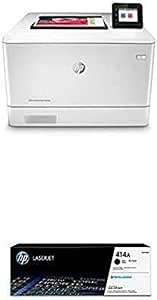
HP M454dw Color LaserJet Pro Wireless Printer + Black Toner
Laser color printing with automatic duplex and Wi-Fi Direct cuts per-page costs while keeping small-business print queues moving.
Check availability
Affiliate Disclosure: As an Amazon Associate, Studio Supplies earns from qualifying purchases made through links on this page, at no additional cost to you. This helps support our editorial team.
Notice a mistake? Let Us Know
Overview
Specifications
Print Technology
Laser
Print Type
Color
Duplex Printing
Automatic (built-in)
Connectivity
Wi-Fi Direct, USB
Walk-up USB
Microsoft Office files and PDFs
Security
Embedded security features
Model
HP Color LaserJet Pro M454dw
Frequently Asked Questions
Does the M454dw require a network connection or can it print standalone?
Wi-Fi Direct allows devices to print directly to the M454dw without a shared network — the printer creates its own wireless access point. For walk-up USB printing of Office files and PDFs, no network or computer is needed at all.
What print technology does the M454dw use and why does it matter for business use?
The M454dw uses laser technology, which fuses toner to paper using heat — not inkjet. This produces smear-resistant output immediately off the printer, with no warm-up wait after idle periods common to inkjet. Laser is significantly more cost-effective per page at business print volumes.
Does the M454dw support automatic two-sided printing?
Yes. Automatic duplex (two-sided) printing is built in, reducing paper consumption by up to 50% on double-sided documents without manual page flipping.
What security features are embedded in the M454dw?
HP embeds security features in the M454dw, though the specific capabilities (such as PIN printing, secure erase, or fleet management integration) are not enumerated in the available product data. Buyers with specific compliance requirements should consult HP's full security documentation for this model.
Can the M454dw print from mobile devices?
Wi-Fi Direct connectivity supports mobile printing workflows. Compatibility with HP Smart app, Apple AirPrint, or Mopria depends on firmware version — verify current firmware support on HP's product page for your specific use case.
Related Products


