

HP
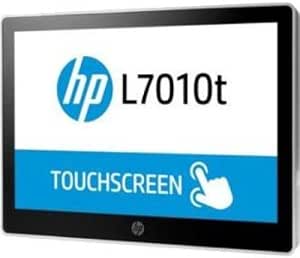
HP T6N30A8 7010T Smart Buy Touch Monitor
HP Smart Buy 7010T: Tailored Touch Solutions for Your Business The HP Smart Buy 7010T Touch Monitor is meticulously crafted to empower businesses with fully customizable POS solutions. Designed to offer unparalleled flexibility, this touch monitor seamlessly integrates into your retail environmen...
View price on Amazon
Affiliate Disclosure: As an Amazon Associate, Studio Supplies earns from qualifying purchases made through links on this page, at no additional cost to you. This helps support our editorial team.
Notice a mistake? Let Us Know
Overview
HP Smart Buy 7010T: Tailored Touch Solutions for Your Business
The HP Smart Buy 7010T Touch Monitor is meticulously crafted to empower businesses with fully customizable POS solutions. Designed to offer unparalleled flexibility, this touch monitor seamlessly integrates into your retail environment, enhancing functionality and streamlining operations. With the HP Smart Buy 7010T, businesses can create a comprehensive POS system that perfectly aligns with their unique requirements and workflows, ensuring maximum efficiency and customer satisfaction.
Key Features
Refresh rate :76 hertz
Specifications
Model Number
T6N30A8
Display Feature
Touch
Refresh Rate
76 hertz
Frequently Asked Questions
What is the refresh rate of the HP T6N30A8 Smart Buy Touch Monitor?
The HP T6N30A8 Smart Buy Touch Monitor features a refresh rate of 76 hertz.
Does this monitor support touch input?
Yes, the HP T6N30A8 is a Touch Monitor, indicating it supports touch input for interactive use.
What type of resolution does this HP monitor offer?
The provided information does not specify the exact resolution for the HP T6N30A8 Smart Buy Touch Monitor.
Is this monitor suitable for gaming?
While its 76Hz refresh rate is better than standard 60Hz, dedicated gaming monitors typically offer higher refresh rates like 120Hz or 144Hz for optimal gaming performance.
What is the significance of "Smart Buy" in the product name?
"Smart Buy" typically indicates a product that is part of a program offering competitive pricing or configurations, often aimed at business or educational institutions.
Related Products

