

HP
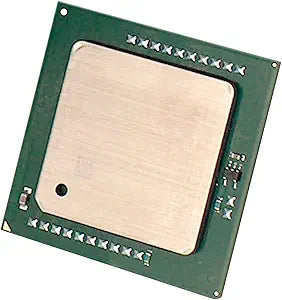
HP T9U23AA Z640 Xeon E5-2690 V4 2nd CPU
Unleash Powerful Performance for Demanding Workloads Introducing the HP T9U23AA Z640 Workstation CPU. Designed to deliver exceptional processing power for professional applications, this component is perfect for upgrading or building high-performance computing systems. Brand: HP Model: ...
$10,323.00*
Check availability
*Price sourced from Amazon.com. Last updated:Oct 25, 2026.Price and availability are subject to change — details.
Affiliate Disclosure: As an Amazon Associate, Studio Supplies earns from qualifying purchases made through links on this page, at no additional cost to you. This helps support our editorial team.
Notice a mistake? Let Us Know
Overview
Unleash Powerful Performance for Demanding Workloads
Introducing the HP T9U23AA Z640 Workstation CPU. Designed to deliver exceptional processing power for professional applications, this component is perfect for upgrading or building high-performance computing systems.
- Brand: HP
- Model: T9U23AA
- Compatibility: HP Z640 Workstation
Key Features
T9U23AA
Specifications
Model
T9U23AA
Processor Type
Xeon E5-2690 V4
Compatibility
HP Z640 Workstation
Component Type
2nd CPU
Frequently Asked Questions
Is this product a complete workstation or just a component?
This product is a 2nd CPU (T9U23AA), specifically the Xeon E5-2690 V4, designed to enhance an existing HP Z640 workstation.
What is the purpose of adding a 2nd CPU like the HP T9U23AA Z640 Xeon E5-2690 V4?
Adding a second CPU significantly boosts the processing power of a workstation, which is beneficial for complex computations, rendering, and other CPU-intensive tasks.
Is this CPU compatible with all HP workstations?
No, the HP T9U23AA Z640 Xeon E5-2690 V4 is specifically designed for compatibility with the HP Z640 workstation only.
What kind of performance improvement can be expected with this CPU upgrade?
The Xeon E5-2690 V4 is a high-performance processor, and adding a second one can substantially improve performance in applications optimized for multi-core and multi-processor systems.
Are there any special installation requirements for this second CPU?
Installing a second CPU typically requires some technical knowledge to ensure proper placement, thermal paste application, and cooling setup within the workstation chassis.
Related Products


