



HP
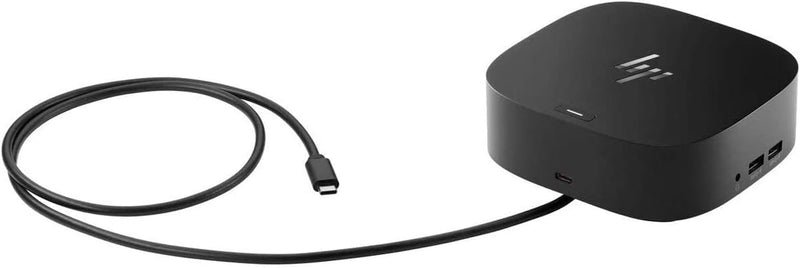
HP USB-C Dock G5 Universal Docking Station
★★★★★
77 inUSB-CUSB 3.0DisplayPortHDMI 2.0
A compact single-cable dock that adds three displays, seven USB ports, and 100W charging to any USB-C laptop.
$67.44*$129.91Save 48%
View on Amazon
✓ In Stock on Amazon.com
*Price sourced from Amazon.com. Last updated:Jun 04, 2026.Price and availability are subject to change.
Affiliate Disclosure: Studio Supplies may earn a commission from qualifying purchases made through links on this page, at no additional cost to you. This helps support our editorial team.
Notice a mistake? Let Us Know
Overview
Key Features
Compatible with your mixed PC environment: Designed with universal compatibility in mind, this dock works with both HP and non-HP USB-C - and Thunderbolt -enabled notebooks., Single-cable solution: Add your accessories and up to three displays to the dock. Then simply connect it to your notebook through a single USB-C cable to access your devices and charge your PC
Small footprint: Reclaim your desk with a compact dock that takes up only 5 x 5 inches of space., Easily manage your commercial HP fleet: Help IT secure and remotely manage your deployed commercial HP notebooks and the dock with advanced network manageability features that include PXE Boot, LAN/WLAN switching, and WoL and MAC Address Pass-Through in all power states.
Electronic asset management for your docks: Empower your IT to manage and track your docks by product name, serial number, and MAC Address from anywhere with the time-saving, easy-to-use Electronic Tag (eTag) asset management tool., Ports: 1 USB Type-C (front); 1 USB 3.0 (side, charging SS); 3 USB 3.0 (back, charging); 2 DisplayPort; 1 HDMI 2.0; 1 headphone/microphone combo
Compatible operating systems: Windows 7; Windows 10; Chrome OS; MacOS; Ubuntu Linux v18.04, Dimensions (W X D X H): 4.8 x 4.8 x 1.77 in
Weight: 1.49lb, IFor Chromebook Enterprise x360; Elite Dragonfly; ProBook 430 G7, 440 G7, 450 G7; ProBook x360
Specifications
Brand
HP
Model
USB-C Dock G5
Connectivity
Single USB-C Cable
USB-C Ports
1 × USB Type-C (Front)
USB 3.0 Ports
1 × USB 3.0 (Side, Charging SS), 3 × USB 3.0 (Back, Charging)
Display Outputs
2 × DisplayPort, 1 × HDMI 2.0
Audio
1 × Headphone/Microphone Combo
Max External Displays
3
Compatible OS
Windows 7, Windows 10, Chrome OS, macOS, Ubuntu Linux v18.04
Network Management
PXE Boot, LAN/WLAN Switching, WoL, MAC Address Pass-Through, eTag
Dimensions (W × D × H)
4.8 × 4.8 × 1.77 inches
Weight
1.49 lbs
Pros & Cons
👍 Pros
- Single USB-C cable handles data, display, and charging, eliminating cable clutter on the desk
- Supports up to three external displays through two DisplayPort and one HDMI 2.0 output
- Compact 4.8 × 4.8-inch footprint takes minimal desk space compared to most multi-display docks
- Universal compatibility across HP and non-HP notebooks on Windows, macOS, Chrome OS, and Linux
- Enterprise management features including PXE Boot, WoL, and eTag make it IT-friendly for fleet deployment
👎 Cons
- Lacks USB-C ports on the rear — the only USB-C connection is the front-panel host port
- No SD or microSD card reader, which many competing docks in this class include
- Supported operating system list does not include Windows 11 or newer macOS versions in official specs
- At 1.49 lbs it is heavier than many portable USB-C hubs, making it more of a desk-permanent solution
Frequently Asked Questions
Does this dock work with non-HP laptops?
Yes. The USB-C Dock G5 is designed for universal compatibility and works with both HP and non-HP USB-C and Thunderbolt-enabled notebooks, including those running Windows, macOS, Chrome OS, and Ubuntu Linux.
How many external monitors can I connect simultaneously?
The dock supports up to three external displays using its two DisplayPort outputs and one HDMI 2.0 port. Actual multi-display support depends on your laptop's USB-C or Thunderbolt capabilities.
Does the dock charge my laptop while it's connected?
Yes. The dock delivers power to your notebook through the same single USB-C cable used for data and display connections, so you do not need a separate charger plugged into the laptop.
How large is the dock — will it fit on a crowded desk?
The HP USB-C Dock G5 measures just 4.8 × 4.8 × 1.77 inches, taking up roughly 5 × 5 inches of desk space. It weighs 1.49 lbs and can be placed vertically or horizontally.
Can IT departments remotely manage this dock?
Yes. The dock includes enterprise features like PXE Boot, LAN/WLAN switching, Wake-on-LAN, MAC Address Pass-Through, and Electronic Tag (eTag) asset management for remote tracking and configuration.
Related Products


