



HP
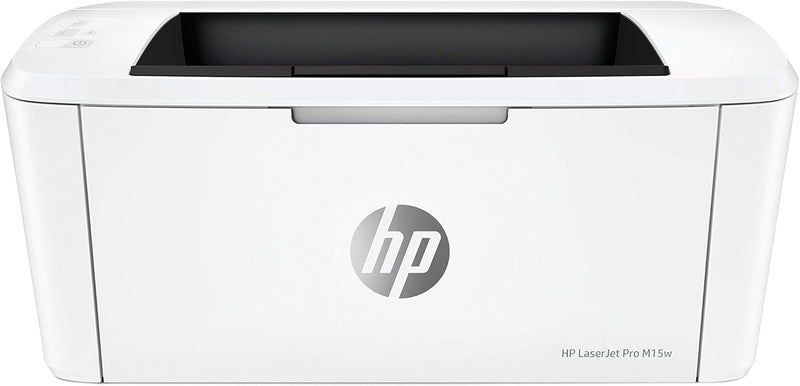
HP W2G51A Laserjet Pro M15w Wireless Printer (Renewed)
Compact and Wireless Laser Printing for Efficient Productivity The HP Laserjet Pro M15w is a renewed wireless laser printer that delivers professional-quality monochrome prints in a compact design. With fast printing speeds and wireless connectivity, it's perfect for home or small office environ...
$189.00*$212.99Save 11%
View on Amazon
✓ In Stock on Amazon.com
*Price sourced from Amazon.com. Last updated:Aug 31, 2026.Price and availability are subject to change — details.
Affiliate Disclosure: As an Amazon Associate, Studio Supplies earns from qualifying purchases made through links on this page, at no additional cost to you. This helps support our editorial team.
Notice a mistake? Let Us Know
Overview
Compact and Wireless Laser Printing for Efficient Productivity
The HP Laserjet Pro M15w is a renewed wireless laser printer that delivers professional-quality monochrome prints in a compact design. With fast printing speeds and wireless connectivity, it's perfect for home or small office environments.
- Printing Technology: Laser
- Connectivity: Wi-Fi, USB
- Print Speed: Up to 19 ppm
- Resolution: 600 x 600 dpi
- Wireless Capability: Yes
- Additional Features: HP Smart App Support
Key Features
This Certified Refurbished product is tested and certified to look and work like new. The refurbishing process includes functionality testing, basic cleaning, inspection, and repackaging. The product ships with all relevant accessories, a minimum 90-day warranty, and may arrive in a generic box. Only select sellers who maintain a high performance bar may offer Certified Refurbished products on Amazon.com
WORLD’S SMALLEST LASER PRINTER IN ITS CLASS – HP’s smallest LaserJet Pro is 35% smaller than its predecessor yet still delivers the same professional-quality black and white prints you’ve come to expect.
FAST PRINTING – Prints up to 19 pages per minute, with the first page out in as few as 8.1 seconds
THE POWER OF YOUR LASER PRINTER IN THE PALM OF YOUR HAND – The HP Smart app allows you to easily scan from your smartphone or tablet, order toner, and print from the cloud, such as iCloud, Google Drive, and Dropbox
WIRELESS CONNECTIVITY YOU CAN COUNT ON – Built-in wireless capabilities let you easily access, print, and share resources on a network; for those with no Wi-Fi connection, connect directly to the wireless laser printer using Wi-Fi Direct
Specifications
Product Status
Certified Refurbished
Warranty
Minimum 90-day
Printer Type
LaserJet Pro
Printing Capability
Black and White
Print Speed
Up to 19 pages per minute
First Page Out (Black)
As fast as 8.1 seconds
Connectivity
Wireless, Wi-Fi Direct
Mobile App Compatibility
HP Smart app
Frequently Asked Questions
What does "Certified Refurbished" mean for this printer?
A Certified Refurbished product is tested and certified to look and work like new, undergoing functionality testing, cleaning, inspection, and repackaging, and comes with a minimum 90-day warranty.
Is this printer capable of printing in color?
No, this HP LaserJet Pro M15w Wireless Printer is designed to deliver professional-quality black and white prints only.
How quickly does this printer produce pages?
This printer offers fast printing speeds, producing up to 19 pages per minute, with the first page coming out in as few as 8.1 seconds.
Can I print from my smartphone or tablet with this printer?
Yes, the HP Smart app allows you to easily print from your smartphone or tablet, as well as scan documents and order toner.
What wireless connectivity options are available for this printer?
It features built-in wireless capabilities for network access and Wi-Fi Direct for connecting directly to the printer without a Wi-Fi network.
Related Products


