



Kfwfuaee
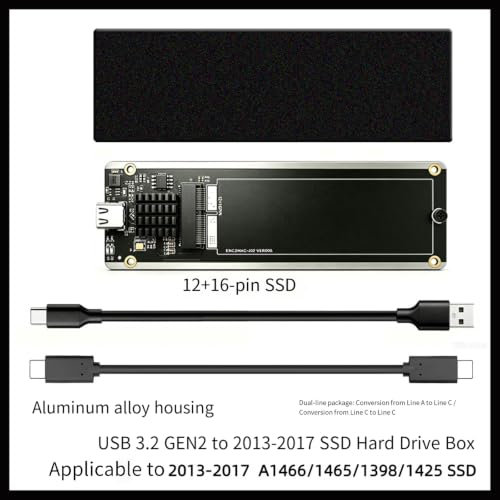
Kfwfuaee USB-C SSD Enclosure for 2013-2017 MacBook Drives
Turn a removed 2013-2017 MacBook SSD into fast USB 3.2 Gen 2 external storage, with both Type-C cables already in the box
$43.29*
Check availability
*Price sourced from Amazon.com. Last updated:Oct 22, 2026.Price and availability are subject to change — details.
Affiliate Disclosure: As an Amazon Associate, Studio Supplies earns from qualifying purchases made through links on this page, at no additional cost to you. This helps support our editorial team.
Notice a mistake? Let Us Know
Overview
Key Features
Plug Play Workflow: Built for straightforward reading and transfer tasks, the enclosure supports plug-and-play use and hot swapping to reduce setup friction during desk checks or routine data jobs
Removed Drive Access: Use the Type-C enclosure with a taken-out notebook SSD so you can reach stored files, handle backup workflow, or review drive contents on another computer without reopening the laptop
Aluminum Housing Design: The metal enclosure body gives the drive reader a stable structure for repeated handling on a repair desk, migration station, or temporary external access setup
Technical Ready Package: USB 3.2 Gen 2 gives specification-focused users a clear interface reference, while the enclosure and both cables arrive together for immediate setup planning
Cable Pair Included: The package includes a Type-C to USB-A cable and a Type-C to Type-C cable to fit different host ports and keep transfer work moving without extra accessory searches first
Specifications
Brand
Kfwfuaee
Product Type
SSD enclosure / drive reader case
Interface
USB 3.2 Gen 2
Connector
Type-C
Housing Material
Aluminum
Compatibility
2013-2017 A1466 / A1465 / A1398 notebook SSDs
Included Cables
Type-C to USB-A and Type-C to Type-C
Operation
Plug-and-play with hot swapping
Frequently Asked Questions
Which notebook SSDs is this Kfwfuaee enclosure designed to fit?
It is built for the proprietary SSDs from 2013-2017 A1466, A1465, and A1398 notebooks. It targets that specific drive family rather than standard M.2 or NVMe SSDs.
Do I need to buy a separate cable to connect it to my computer?
No. The package includes both a Type-C to USB-A cable and a Type-C to Type-C cable, so it fits older and newer host ports without any extra accessory purchase.
What is the connection interface and connector type?
The enclosure uses a Type-C connector over a USB 3.2 Gen 2 interface, giving specification-focused users a clear high-speed reference point for the connection.
Can I use this without reopening or damaging the laptop the SSD came from?
Yes. Once the SSD is removed, the enclosure lets you reach files, review contents, or run a backup workflow on another computer without reopening the original laptop.
Is the housing durable enough for regular use at a repair bench?
The body uses an aluminum housing that gives the reader a stable structure for repeated handling, which suits a repair desk, migration station, or temporary external access setup.
Does it support quick swapping between drives?
Yes. It supports plug-and-play use and hot swapping, which reduces setup friction when moving through several drives during desk checks or routine data jobs.
Related Products


